Product Photo Prompts for Ecommerce: 12 GPT Image 2 Templates
Copy ecommerce product photo prompts for main images, lifestyle scenes, ad variants, packaging shots, and practical quick fixes with GPT Image 2.
Strong product photo prompts for ecommerce describe the product, channel, scene, lighting, camera feel, brand constraints, and what must not change. Start with a real product reference when accuracy matters, then ask GPT Image 2 for a specific asset type: marketplace main image, PDP gallery shot, lifestyle scene, ad creative, packaging image, or fix pass.
This guide gives you copyable prompts and a small editing system for GPTIMG2 AI. For a broader visual workflow, read GPT Image 2 for Ecommerce Product Photos. For more prompt ideas, use the GPT Image 2 prompt library as the canonical hub.
The prompt formula
Most ecommerce prompt examples work because they make seven decisions explicit.
| Prompt part | What to write | Why it matters |
|---|---|---|
| Product truth | Shape, label, material, color, packaging, exact reference role | Prevents attractive but inaccurate results |
| Channel | Amazon-style main image, Shopify PDP, paid social, landing page, email banner | Changes crop, background, and risk tolerance |
| Scene | White studio, marble slab, kitchen counter, bathroom shelf, outdoor setup | Gives the model a concrete visual job |
| Lighting | Softbox, window light, golden hour, macro flash, clean reflection | Controls realism and product readability |
| Camera feel | Front-facing packshot, top-down flatlay, 85mm hero, 100mm macro | Prevents vague "premium" styling |
| Brand constraints | Minimal, playful, clinical, luxury, sustainable, DTC, bold color | Keeps the image useful for the brand |
| Negative rules | No distorted logo, no fake claims, no extra products, no unreadable text | Protects catalog accuracy |
Use this base structure:
Create a [channel and asset type] for the uploaded [product].
Preserve the exact [shape, label, color, material, proportions, logo placement].
Place it in/on [scene or surface] with [lighting] and [camera/composition].
The mood should feel [brand direction], suitable for [store, ad, PDP, marketplace].
Do not add [props, extra products, fake claims, distorted text, watermarks, hands, clutter].
When you open the GPT Image 2 workspace, upload the product image first if the result must preserve an actual SKU. Text-only prompts are better for concepting new packaging, mood boards, or fictional products.
12 copyable product photo prompts
Use these as templates. Replace the bracketed details with your actual product, and keep the constraints that matter for your channel.
1. Marketplace main image
Use this for the first product image on a marketplace or a conservative PDP gallery.
Create a marketplace-ready main product image from the uploaded product reference.
Preserve the exact product shape, proportions, color, material, label text, logo placement, and packaging details.
Place the product centered on a pure white background with realistic soft studio lighting and a subtle natural contact shadow.
Show the entire product clearly, front-facing, with no cropping and no perspective distortion.
Do not add props, people, hands, badges, sale text, rating graphics, watermarks, extra accessories, or additional products.
2. Soft gray studio hero
Use this when a pure white image feels too flat for a brand store but the product still needs to stay clean.
Create a premium ecommerce studio hero image for the uploaded product.
Preserve the exact product identity, label placement, color, material finish, and proportions.
Place the product on a soft light-gray seamless background with gentle gradient depth, realistic softbox lighting, and a refined shadow.
Use a front three-quarter angle that shows the product shape clearly.
Keep the composition minimal, polished, and suitable for a modern Shopify product page.
Do not change the logo, invent claims, add props, add extra text, or make the product look like a 3D render.
3. PDP gallery angle
Use this to create the second or third image in a product page gallery.
Create a product detail page gallery image from the uploaded product reference.
Show the product from a useful alternate angle that reveals the side profile, opening, texture, or functional detail.
Preserve the exact shape, dimensions, material, label placement, and color.
Use a clean neutral studio surface, realistic lighting, and a natural shadow.
Keep the product large and clear, with no decorative clutter.
Do not add inaccurate parts, extra accessories, unreadable label changes, or lifestyle props.
4. Lifestyle image for a brand store
Use this for homepage, collection page, or product page storytelling.
Create a realistic lifestyle ecommerce photo for the uploaded product.
Preserve the product shape, color, logo, packaging details, and material finish.
Place it in a believable [room or use environment] with soft natural light and a small set of supporting props that match the product category.
The product must remain the hero subject, sharp and clearly visible.
Leave clean negative space on the [left/right/top] for website copy.
Use a premium product photography style, not illustration, fantasy art, or CGI.
Do not distort the label, add extra products, invent claims, or make the scene cluttered.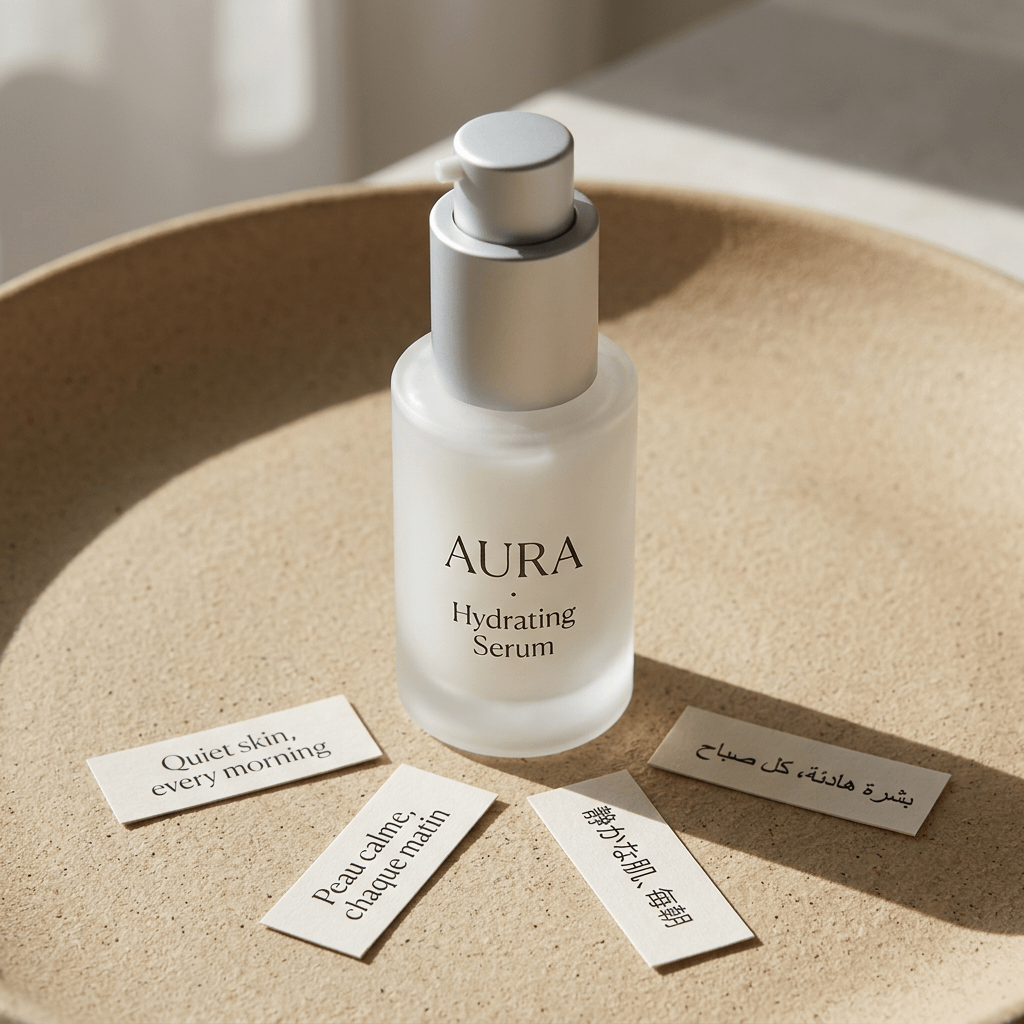
A studio lifestyle product shot example from the prompt library. It matches the prompt above: product identity stays central while surface, light, props, and mood shape the ecommerce image.
Matching prompt from the prompt library:
A minimalist luxury skincare product photograph of a frosted glass serum bottle standing upright at the center of a large shallow beige ceramic tray with a slightly raised rim. The bottle has a matte silver pump dispenser with a short side nozzle and a clean cylindrical form. On the bottle, elegant black serif typography reads "AURA" and "Hydrating Serum".

Around the bottle on the tray are exactly 4 small off-white paper cards placed loosely in the foreground and right side, each printed with a short phrase in a different language. Warm natural morning sunlight streams in from the upper left, casting long soft-edged shadows across the sandy textured tray surface. The background is softly blurred and neutral, with creamy beige architectural shapes and a calm editorial spa aesthetic. Photorealistic studio lifestyle product shot, high-end beauty campaign look, soft warm tones, subtle texture, shallow depth of field, refined minimalist composition, premium packaging photography.
5. Top-down flatlay
Use this for accessories, beauty products, wellness items, stationery, food packaging, or bundles.
Create a top-down ecommerce flatlay for the uploaded product.
Preserve the exact product identity, packaging, label text, color, and proportions.
Place the product on a [surface: marble slab, linen fabric, wood tabletop, matte pedestal] with 3 to 5 supporting props that fit the brand story.
Use balanced natural light, crisp shadows, and a clean uncluttered layout.
Keep the product as the largest and clearest object in the composition.
Do not add random props, fake labels, hands, watermarks, or unreadable decorative text.
6. Macro texture detail
Use this when material quality matters more than another full-product shot.
Create a macro product detail image focused on the [texture, stitching, fabric grain, metal finish, cream texture, label embossing] of the uploaded product.
Preserve the real material, color, and product detail from the reference.
Use realistic close-up product photography with sharp focus, controlled highlights, and shallow depth of field.
The image should help shoppers understand quality and tactile feel.
Do not invent new patterns, change the material, add text overlays, or make the surface look artificial.
7. In-hand size reference
Use this when shoppers need scale.
Create an ecommerce scale-reference photo showing the uploaded product held naturally in one hand.
Preserve the exact product shape, color, label, material, and proportions.
Use a clean neutral background, realistic hand proportions, and soft studio lighting.
Keep the product sharp and fully visible, with the hand only supporting scale.
Do not distort the product, cover important label details, add jewelry distractions, add extra products, or change the product size unrealistically.
8. Paid social ad creative
Use this for a scrollable ad, not a strict marketplace main image.
Create a premium paid social ad image for the uploaded product.
Preserve the product identity, shape, logo, label placement, and material finish.
Use a bold but realistic campaign composition with layered background shapes, strong directional lighting, and enough empty space for a short headline.
Place the product as the central hero and make it readable at mobile feed size.
Add the headline text exactly: "[SHORT HEADLINE]".
Use clean modern typography.
Do not invent product claims, add fake certifications, distort the logo, add cluttered badges, or make the text unreadable.
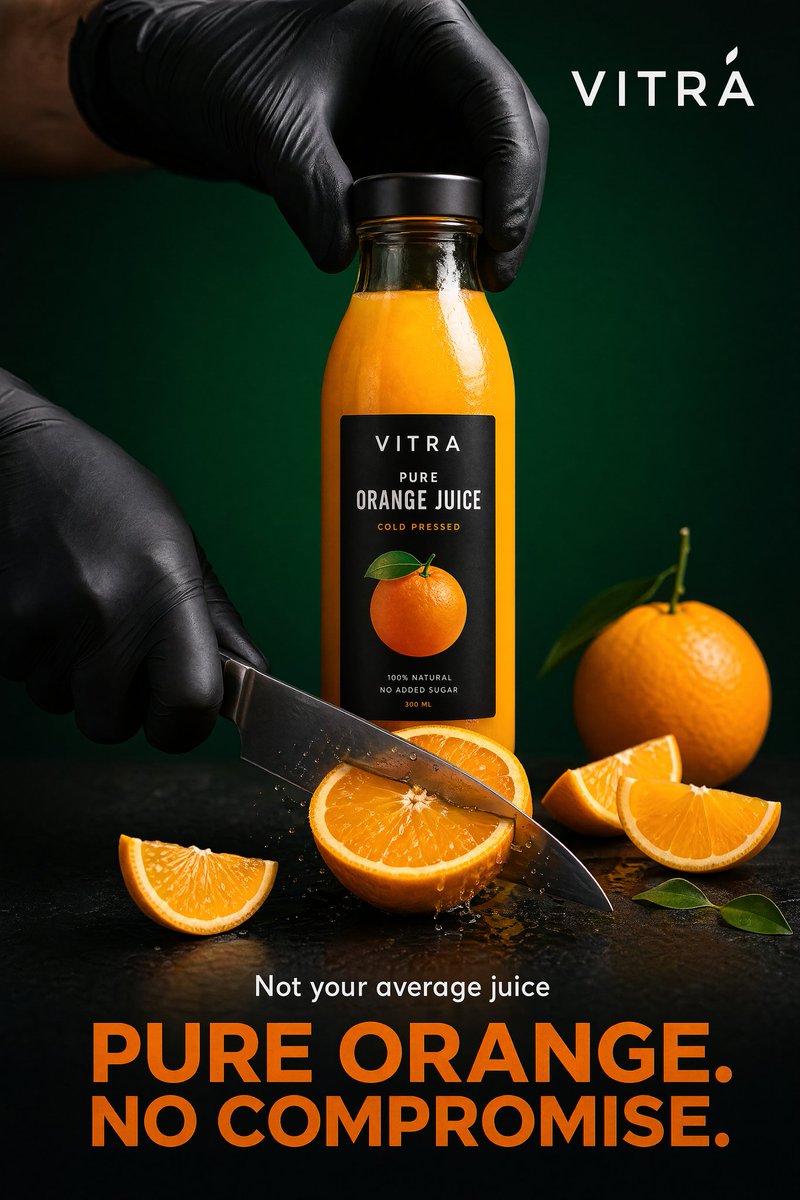
A product-ad style example from the GPT Image 2 prompt library. It belongs with paid social and campaign prompts because it uses headline space, dramatic light, product hero framing, and ad-grade composition.
Matching prompt from the prompt library:
Create a bold, high-end commercial poster for a premium orange juice brand, shot in a hyper-realistic studio environment with a strong emphasis on freshness, precision, and striking visual appeal.

Hero composition: a sleek transparent bottle filled with vibrant orange juice stands at the center. The label is minimal, modern, and premium. Two hands wearing matte black gloves interact with the product: one hand grips the bottle from the top, while the other slices through a thick orange with a stainless steel knife.

Use a deep green gradient background, dark matte table, dramatic studio lighting, crisp highlights on the bottle and knife, and clean shadows for contrast. Add a modern brand name, a small line "Not your average juice", and a large bold headline "PURE ORANGE. NO COMPROMISE." The final image should feel like high-end food advertising with ultra-sharp details, premium editorial styling, and strong visual hierarchy.
9. Seasonal campaign variant
Use this when you need a holiday, summer, back-to-school, or launch campaign without reshooting.
Create a seasonal ecommerce campaign image for the uploaded product.
Preserve the product shape, label, color, logo placement, and material finish exactly.
Place the product in a [seasonal setting] with tasteful props, realistic lighting, and a clean commercial composition.
The seasonal elements should support the product, not cover it.
Keep enough negative space for campaign copy.
Do not add fake limited-edition claims, change the packaging, add extra products, or make the scene look like a fantasy render.
10. Packaging dieline or mockup
Use this for boxes, labels, pouches, or packaging concept review.
Create a clean ecommerce packaging dieline or flat-net review image for [product category].
Flatten the 3D packaging into a 2D net.
Expand all panels and tabs with orthographic projection and no distortion.
Map textures and label artwork precisely.
Add contrasting die-lines on a pure white background.
Keep the output clean enough for packaging review, not just a decorative render.
Do not add unreadable micro text, fake certifications, random claims, warped logos, or extra design elements not requested.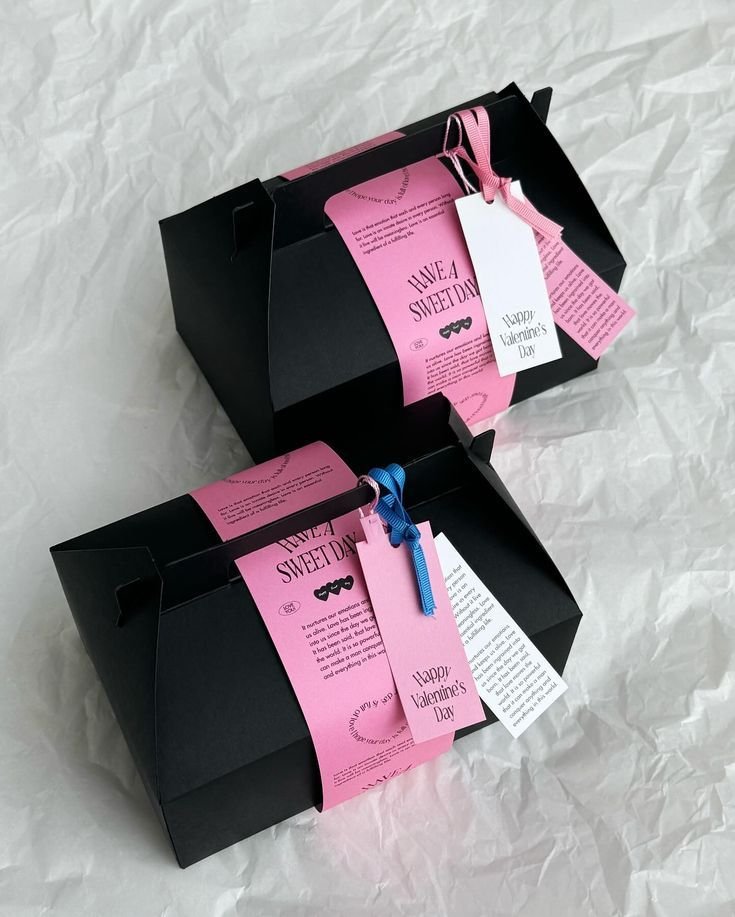
A packaging dieline example from the prompt library. Packaging prompts should separate review-ready layout from decorative product renders.
Matching prompt from the prompt library:
Flatten 3D packaging into 2D net. Expand all panels and tabs. Orthographic projection, no distortion. Map textures precisely. Add contrasting die-lines. Pure white background.11. Bundle or comparison lineup
Use this for kits, multipacks, size variants, colorways, or before-and-after bundles.
Create a clean ecommerce lineup image showing [number] product variants from the uploaded references.
Preserve the exact identity, label, color, proportions, and packaging details of each item.
Arrange the products in a balanced row on a neutral studio surface with consistent lighting and natural shadows.
Make size differences and variant differences easy to understand.
Do not invent additional variants, swap labels, change product scale inaccurately, add props, or add promotional badges.
12. Fix pass for a generated image
Use this after a good composition has one or two product problems.
Edit the generated ecommerce image while preserving the overall composition, lighting, crop, and mood.
Fix only these issues: [list exact issues, such as distorted logo, label too soft, product leaning, extra prop, incorrect color, unreadable headline].
Keep the product shape, label placement, color, material, and proportions accurate to the uploaded product reference.
Do not change the background, camera angle, product position, or styling unless required to fix the listed issues.
How to adapt the prompts by product type
The prompt formula stays the same, but each category needs different constraints.
| Product type | Add these constraints |
|---|---|
| Beauty and skincare | Preserve label text, cap shape, bottle transparency, cream texture, clean bathroom or vanity props |
| Food and beverage | Preserve package size and logo, show freshness cues, avoid fake nutrition claims |
| Apparel | Preserve garment cut, fabric texture, stitching, fit, color accuracy, realistic body or flatlay |
| Jewelry | Preserve metal color, gemstone shape, reflections, macro detail, realistic scale |
| Home decor | Preserve dimensions, material, room scale, shadow, and how the object sits on a surface |
| Electronics | Preserve ports, screen, buttons, product geometry, cable/accessory accuracy |
A reliable way to improve results is to replace style words with product facts. "Premium" is weak by itself. "Brushed aluminum, soft reflection, sharp engraved logo, no fingerprints" gives GPT Image 2 a clearer job.
Common failures and quick fixes
| Failure | Fix prompt |
|---|---|
| Logo or label changes | Preserve the uploaded label exactly. Do not rewrite, simplify, translate, or invent any text. |
| Product looks fake | Use realistic product photography with physical shadows, natural reflections, and material-specific highlights. |
| Too many props | Limit props to two small supporting objects. Keep the product as the only hero subject. |
| Main image becomes an ad | No headline, no badges, no sale graphics, no lifestyle background. Product-only marketplace image. |
| Wrong scale | Use realistic scale compared with a hand / table / standard room object. Do not enlarge the product unrealistically. |
| Text is unreadable | Use fewer words, larger typography, high contrast, and keep text away from product edges. |
Run fixes in small passes. If the first image has a strong composition but a bad label, edit the label problem. Do not regenerate the entire concept unless the composition is also wrong.
GPTIMG2 workflow
Use this workflow inside GPTIMG2 AI:
- Upload the cleanest product reference image.
- Pick one asset type from this guide.
- Copy the matching prompt and replace bracketed details.
- Generate 2 to 4 versions.
- Choose the best composition, then run a fix pass for label, product shape, or text.
- Save the prompt that worked into your own prompt library for the next SKU.
If you want more starting points, open the GPT Image 2 prompt library and adapt examples by channel instead of copying them as generic style prompts.
FAQ
What should an ecommerce product photo prompt include?
A useful prompt is specific to the asset type. A marketplace main image should protect product accuracy and avoid props. A lifestyle prompt should define scene, lighting, and supporting props. An ad prompt should reserve space for a short headline and keep product identity stable.
Should I upload a product photo or generate from text only?
Upload a product photo when you need the real SKU, label, shape, material, or proportions to stay accurate. Use text-only prompts for fictional products, concept packaging, mood boards, and early creative exploration.
Can I use these prompts as a free product photo prompt generator?
Yes. Treat the templates as a free prompt generator by swapping product facts, scene, channel, crop, and negative rules. The key is to keep the product constraints specific instead of changing only the adjective.
Why do product photos fail even with detailed prompts?
Most failures come from mixed goals. A prompt that asks for a clean marketplace image, a lifestyle scene, a discount ad, and packaging redesign at the same time gives the model conflicting instructions. Split the job into separate assets and fix one issue per pass.