2026/04/25

GPT Image 2 for Ecommerce Product Photos: A Practical Workflow

Use GPT Image 2 for ecommerce product photos: create main images, lifestyle shots, ad variants, and reference-based edits with GPTIMG2 AI today.

An ecommerce product photo has to do more than look polished. The main image has to identify the exact item, the gallery has to answer buyer questions, the lifestyle shot has to create desire, and the ad creative has to survive a fast scroll without making the product feel fake.

That is why GPT Image 2 for ecommerce product photos is a better framing than "AI product photography" in general. The useful workflow is not one magic prompt. It is a small production system: start from the product, decide the selling channel, generate the right kind of visual, then review the image against both conversion and compliance needs.

OpenAI describes GPT Image 2 as a state-of-the-art image generation model for fast, high-quality generation and editing, with text and image input and image output. The official image generation guide also separates direct image generation from editing and multi-turn image workflows. For ecommerce teams, that matters because product imagery is rarely finished in one pass.

On GPTIMG2 AI, the practical path is to open the GPT Image 2 workspace, upload the product or reference images you need to preserve, and generate a focused set of ecommerce visuals instead of asking for one vague "better product photo."

Quick answer

Use GPT Image 2 for ecommerce product photos when you need to create or revise:

  • clean marketplace-style main images
  • product page gallery shots
  • lifestyle scenes for a brand store
  • social ad variations
  • seasonal campaign images
  • packaging and label mockups
  • reference-based product edits

The highest-value workflow is:

  1. Decide the channel before prompting.
  2. Use a product reference image when shape, label, texture, or identity must stay consistent.
  3. Prompt for the exact ecommerce asset type, not just the aesthetic.
  4. Generate draft versions first, then polish the strongest composition.
  5. Review the final image for product accuracy, readability, and platform rules.

Ecommerce product photos are not one asset type

Most weak AI product-photo workflows fail because they treat every image as the same job.

A marketplace main image is conservative. A product detail page gallery can explain texture, scale, use, and ingredients. A lifestyle image can use props and environment. A paid social ad can include campaign framing, text, and stronger composition.

Those jobs need different prompts.

Ecommerce assetWhat matters mostGPT Image 2 role
Marketplace main imageProduct clarity, clean background, no misleading propsCreate or clean up a simple product-first image
Product page galleryAngles, materials, scale, feature explanationGenerate supporting shots from a consistent product direction
Lifestyle sceneMood, use context, audience fitPlace the product in a believable environment
Social ad creativeScroll-stopping composition, offer framing, readable textBuild campaign variants quickly
Seasonal variantSame product, new setting or occasionEdit a source image while preserving the product

That separation is the core of the workflow. Before writing the prompt, decide which image slot you are filling.

Start with the strictest image: the main product shot

For marketplaces, the safest first asset is usually the simplest one. Amazon-style product image guidance is conservative: clean non-distracting backgrounds, ideally pure white; show the entire product; include only what the customer receives; and avoid promotional text such as sale messages inside the product image.

That does not mean every ecommerce site needs a white-background image everywhere. It means the main image should not be treated like a lifestyle ad.

Use this prompt pattern when you want a clean ecommerce main image:

Create a clean ecommerce main product image from the uploaded product reference.
Preserve the exact product shape, label placement, color, material, and proportions.
Place the product on a pure white background with realistic soft studio lighting and a subtle contact shadow.
Show the entire product clearly, centered, with the product occupying most of the frame.
Do not add props, hands, lifestyle background, extra text, badges, discount labels, or additional products.

This prompt works because it protects the product first. If the generated image changes the bottle shape, invents a new label, or adds an accessory the customer will not receive, it may look nicer but become less useful for a listing.

Use lifestyle photos for persuasion, not compliance

Product pages and brand stores can use richer imagery than marketplace main images. This is where GPT Image 2 becomes more useful for ecommerce teams.

Shopify's product photography guidance treats strong product photos as a series of choices around lighting, exposure, styling, and post-processing. Its ecommerce photography guide also points out that props can set the scene and mood, while composition should leave clear space when the layout needs it.

Turn that into prompt structure:

  • product: what must stay accurate
  • scene: where the product belongs
  • lighting: what makes the product look real
  • props: what supports the story without stealing attention
  • crop: where the image will be used
  • copy space: whether the design needs room for text

Example:

Create a lifestyle ecommerce product photo for the uploaded ceramic coffee mug.
Preserve the mug shape, handle, glaze color, and logo exactly.
Place it on a warm kitchen counter near a window with soft morning light.
Add only simple supporting props: a folded linen cloth and a small plate of toast in the background.
Keep the mug as the clear hero subject, with negative space on the right for website copy.
Use a realistic product photography style, not an illustration or fantasy render.

This is different from "make it cozy." It tells GPT Image 2 what owns the frame and what should stay secondary.

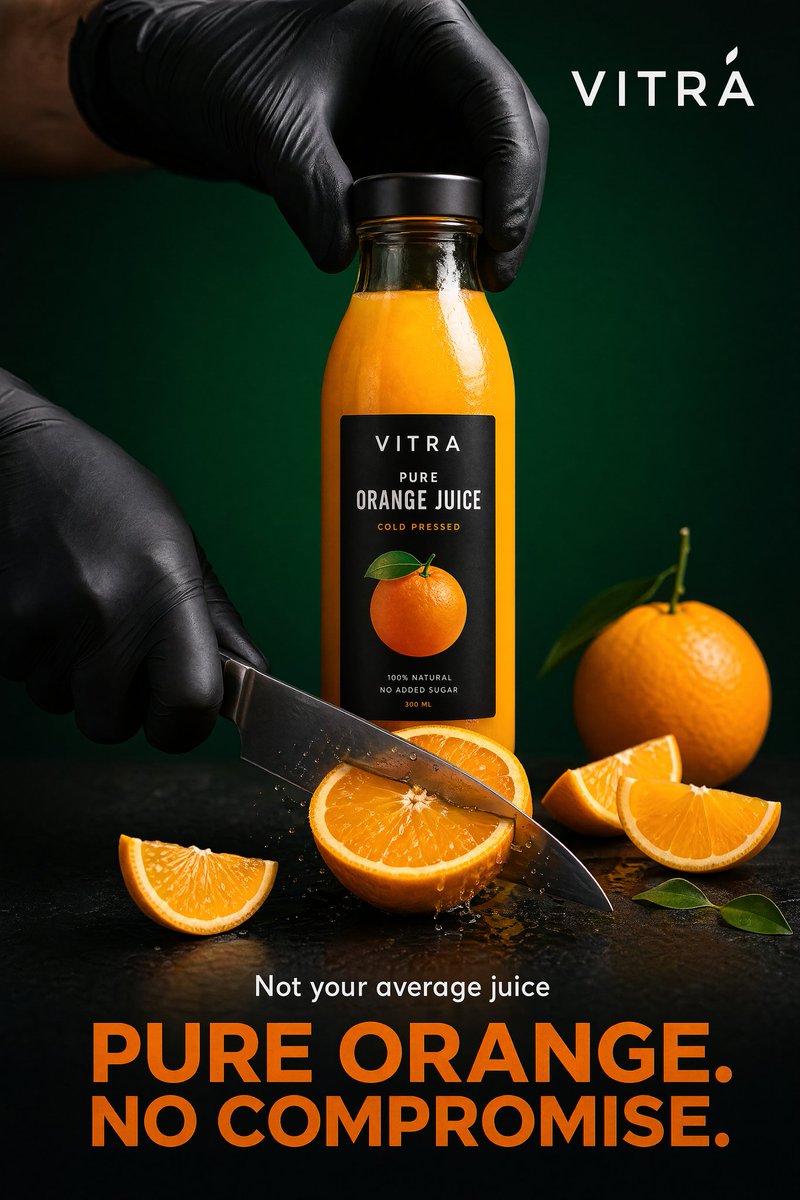
GPT Image 2 ecommerce product photo example showing a premium orange juice bottle ad

A product-ad style example from the GPT Image 2 prompt library. Use richer scenes for brand pages and ads, not for strict marketplace main images.

Build a product photo set, not a single hero image

One strong product image is rarely enough. A better ecommerce workflow is to generate a small set around the same product.

For a typical product page, start with five image jobs:

  1. Main image: clean product-only shot.
  2. Angle image: side, back, open, texture, or scale view.
  3. Lifestyle image: product in a believable use environment.
  4. Feature image: call attention to one material, benefit, or construction detail.
  5. Ad image: more expressive layout for paid social or landing pages.

The reason to use GPT Image 2 is not only speed. It is consistency. When you reuse the same product reference and change one image job at a time, you can build a product family that feels connected.

Inside the GPTIMG2 AI app, start with the clearest product reference you have. Generate the main image first. Then keep the product constraints and change only the image job.

Prompt library examples worth borrowing

The GPT Image 2 prompt library already has several ecommerce-friendly examples. The goal is not to copy every product detail. Borrow the structure: define the product, the layout, the supporting visuals, the text hierarchy, and the final channel.

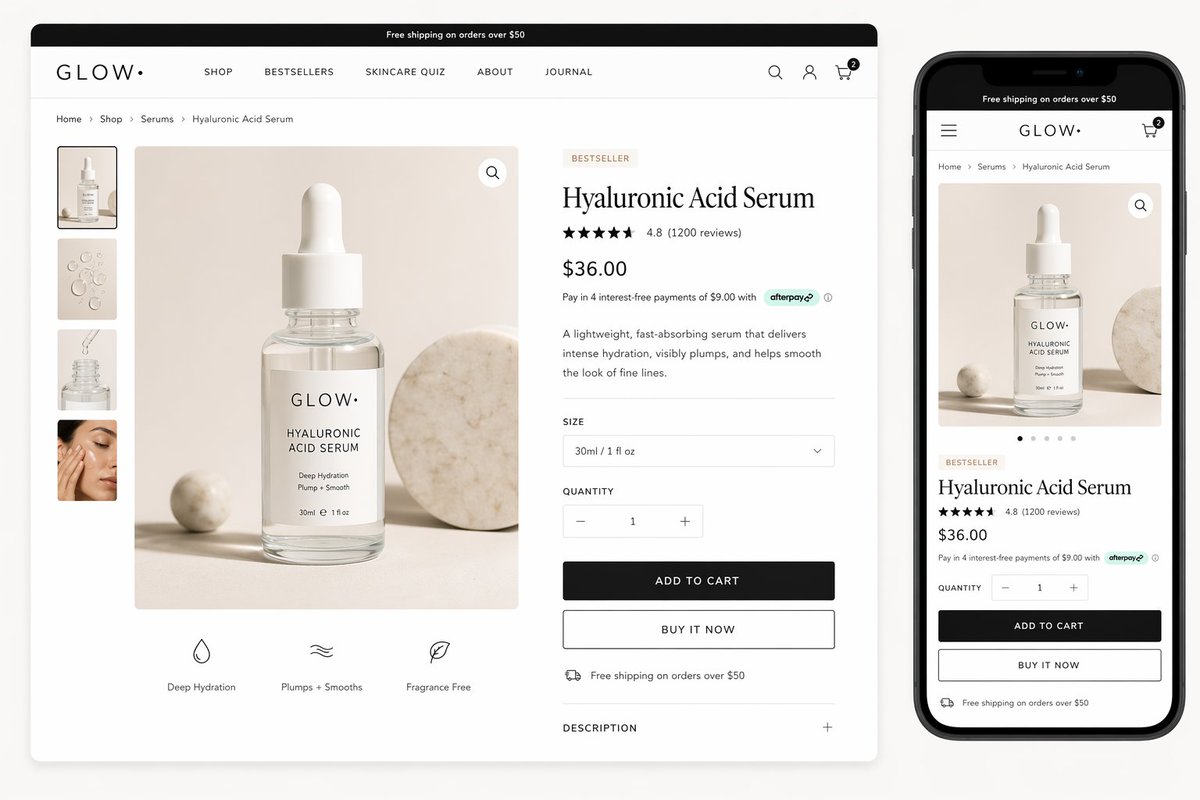
GPT Image 2 ecommerce prompt example showing a luxury skincare product page mockup

Product page mockups are useful when the goal is not only a product photo, but a full ecommerce buying surface with gallery, price, benefits, and CTA layout.

Prompt structure to borrow:

Create a clean luxury skincare product page mockup for a serum brand.
Show one primary packshot, a desktop product detail page, and a mobile preview.
Include product title, rating, price, benefits, size selector, add-to-cart button, and gallery thumbnails.
Keep the product photography premium, realistic, softly lit, and suitable for a modern ecommerce storefront.
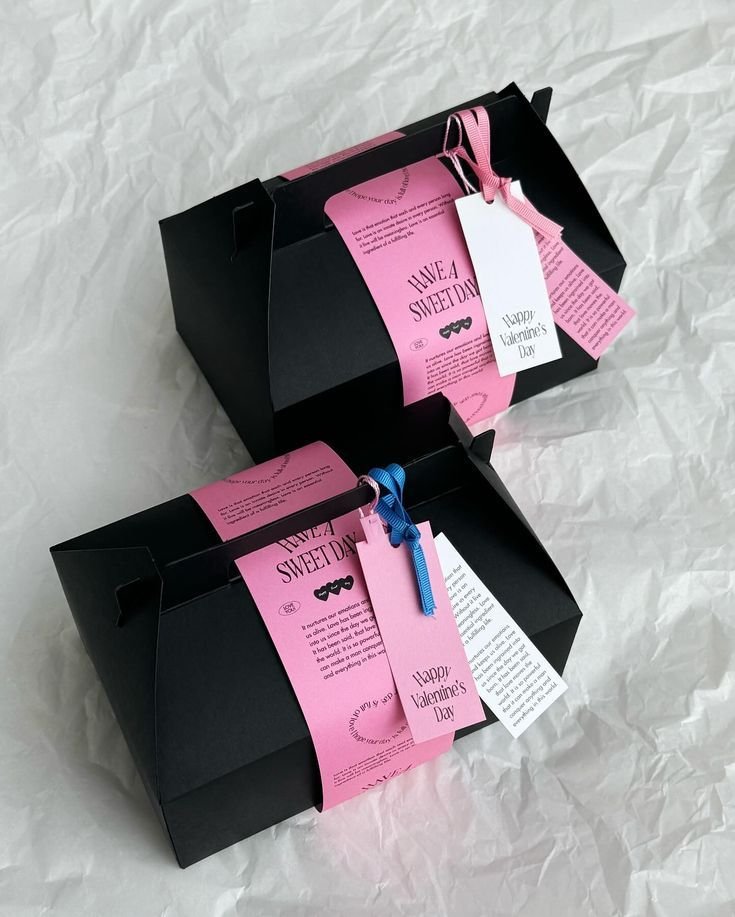
GPT Image 2 ecommerce prompt example showing a packaging dieline flat net

Packaging prompts help ecommerce teams explore box, label, and flat-layout assets before committing to final production artwork.

Prompt structure to borrow:

Flatten 3D packaging into a 2D dieline net.
Expand all panels and tabs with an orthographic projection and no distortion.
Map textures and label artwork precisely.
Add contrasting dielines on a pure white background.
Keep the result clean enough for packaging review, not just a decorative render.

Use reference images when product identity matters

Prompt-only generation is fine for concepting a fictional product. Real ecommerce work usually needs reference images.

Use references when you need to preserve:

  • bottle silhouette
  • clothing cut
  • package dimensions
  • label placement
  • logo position
  • material texture
  • color and finish
  • product proportions

The prompt should tell GPT Image 2 what role each reference plays.

Use reference image 1 as the exact product to preserve.
Use reference image 2 only for the lighting mood and background direction.
Create a premium ecommerce gallery image with the product from reference image 1 placed on a dark stone surface.
Keep the label text, cap shape, bottle proportions, and logo placement unchanged.
Do not copy unrelated objects from reference image 2.

This removes ambiguity. The model knows which image owns the product and which image owns the atmosphere.

For a deeper editing workflow, use the companion guide: How to Edit Images with GPT Image 2 on GPTIMG2 AI.

Prompt for channel-specific formats

Aspect ratio is not a cosmetic choice. It changes the job.

Use:

  • 1:1 for marketplace thumbnails and simple product cards
  • 4:5 for paid social feed creative
  • 9:16 for story or short-form ad placements
  • 16:9 for product page hero sections
  • 21:9 or wider formats for landing-page banners with copy space

If an image keeps failing, do not immediately rewrite the whole prompt. First check whether the format is wrong. A product that looks cramped in 1:1 may work in 4:5. A wide hero image needs space for copy, not a centered product that fills the entire frame.

Three reusable ecommerce prompt recipes

1. Marketplace-style main image

Create a marketplace-ready main product image from the uploaded reference.
Preserve the exact product identity, shape, material, label placement, and color.
Use a clean pure white background, realistic studio lighting, and a natural soft shadow.
Show the entire product clearly with no cropping.
The product should be the only item in the image.
Do not add props, people, badges, sale text, rating graphics, watermarks, or extra accessories.
Create a realistic lifestyle ecommerce photo for the uploaded product.
Preserve the product shape, color, logo, and packaging details.
Place the product in a believable home setting with soft natural light.
Use a small number of supporting props that match the product category.
Keep the product as the hero subject and leave clean negative space for product page layout.
Avoid fantasy styling, distorted labels, extra products, or unreadable decorative text.

3. Paid social product ad

Create a premium paid social ad image for the uploaded product.
Preserve the product identity and make it the central hero.
Use a bold but realistic campaign composition with strong lighting, clean background layers, and readable headline space.
Add the headline text exactly: "Fresh Energy, Every Morning".
Keep typography clean and minimal.
Do not change the product label, invent claims, add fake certifications, or add cluttered promotional badges.

Prompt recipes are starting points. The strongest results come from replacing generic category language with your actual product constraints.

Review the image like a merchandiser

Before publishing an AI-generated product image, review it against the real ecommerce job.

Check product accuracy:

  • Is the shape correct?
  • Did the logo move?
  • Did the label text change?
  • Did the material become unrealistic?
  • Did the model add accessories that are not included?

Check sales usefulness:

  • Is the product clear at thumbnail size?
  • Does the image answer a buyer question?
  • Is there enough whitespace for the layout?
  • Does the image match the rest of the product page?

Check channel risk:

  • Is the main image too much like an ad?
  • Did the image add promotional claims?
  • Did it include text that belongs in the listing UI, not the photo?
  • Does the image need legal, marketplace, or brand review?

GPT Image 2 can accelerate ecommerce image production, but it should not replace the final merchandising review. The fastest teams still check the image against where it will be used.

Where GPTIMG2 AI fits in the ecommerce workflow

Use GPTIMG2 AI when the image job is clear enough to generate:

  • a new product scene from a reference
  • a main-image cleanup direction
  • a product page gallery concept
  • a seasonal ad variation
  • a social creative batch
  • a packaging or label mockup

Start from the GPT Image 2 workspace when you already know the product and channel. Start from the GPT Image 2 prompts page when you need examples for product ads, packaging, ecommerce layouts, or structured prompt patterns.

The best ecommerce use is not replacing every photo shoot. It is reducing the number of expensive manual iterations before a team knows which visual direction is worth producing, polishing, or testing.

FAQ

Can GPT Image 2 replace ecommerce product photography?

Not completely. GPT Image 2 is most useful for concepting, reference-based revisions, lifestyle variants, ads, and product-page supporting images. For strict marketplace listings, final images still need product accuracy and platform compliance review.

Is GPT Image 2 good for white-background product images?

It can help create or clean up simple product-first images, especially when you provide a clear product reference and strict constraints. For marketplace main images, keep prompts conservative: clean background, full product, no props, no promotional text, and no invented accessories.

Should I use reference images for ecommerce product photos?

Yes, when the product is real. Reference images help preserve shape, color, packaging, material, and logo placement. Prompt-only generation is better for fictional products or early visual exploration.

What is the best first image to generate?

Start with the main product image or a clean product-page hero. Once the product identity is stable, generate lifestyle, feature, and ad variants from the same reference and prompt structure.

Can I use GPT Image 2 product photos commercially?

Commercial use depends on the plan, the source materials, the platform where the image will be used, and any brand or marketplace rules that apply. Review rights, claims, logos, packaging details, and platform requirements before publishing.