GPT Image 2 vs GPT Image 1.5: What Actually Changes for Production Image Work?
GPT Image 2 vs GPT Image 1.5: compare status, pricing, editing, text rendering, layout control, migration risk, and which image model to test first.
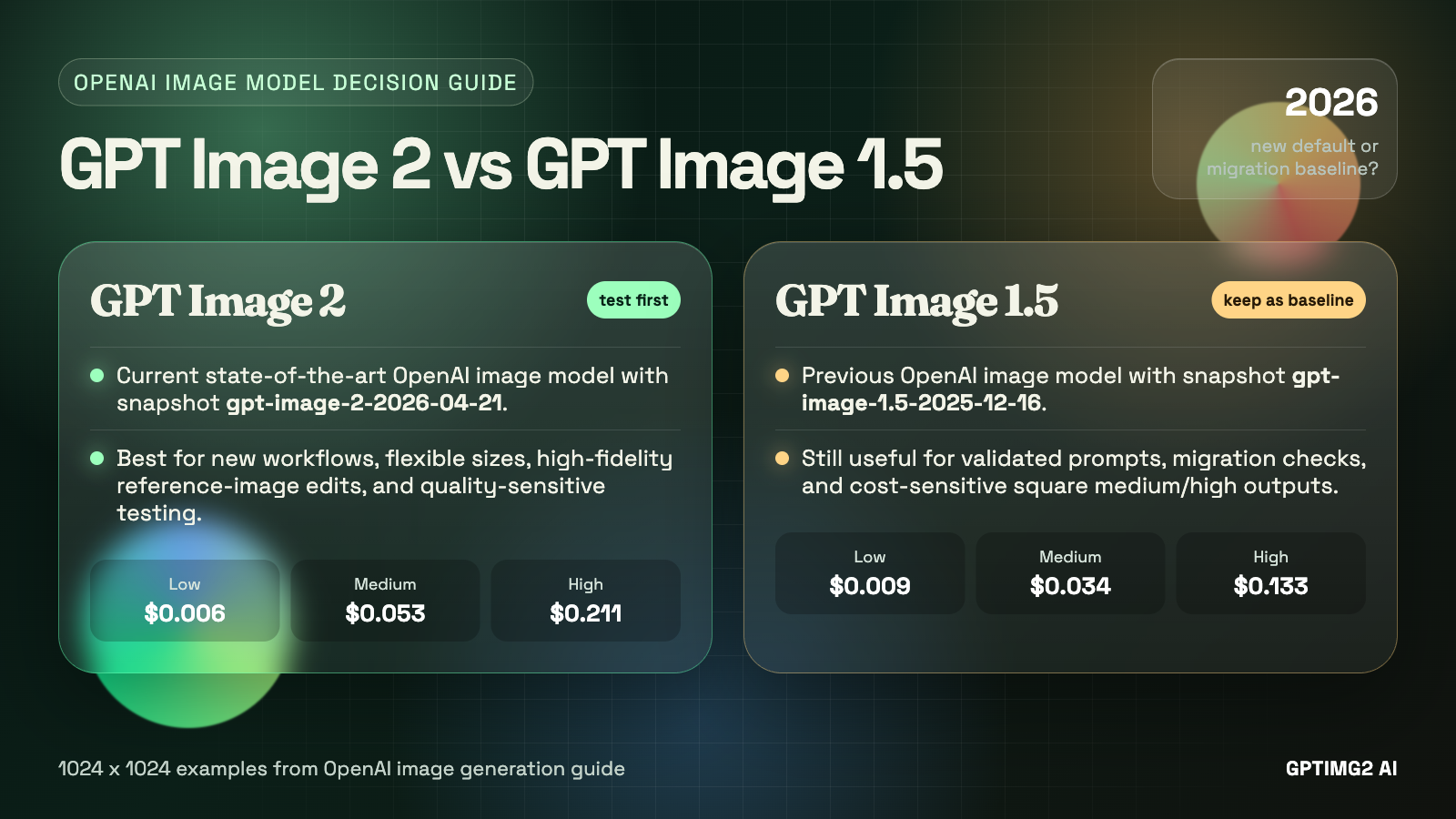
The hard part of choosing between GPT Image 2 and GPT Image 1.5 is not naming anymore. It is migration judgment.
Earlier GPT Image 2 coverage had to talk around leaks, community labels, or indirect evidence. That has changed. OpenAI now lists gpt-image-2 publicly, with the dated snapshot gpt-image-2-2026-04-21. GPT Image 1.5 has also shifted position: OpenAI now describes it as the previous image generation model, not the frontier default.
That does not mean every team should delete GPT Image 1.5 from its workflow tomorrow. A model upgrade still has to survive prompts, cost, reference-image handling, output review, and retry rates. The practical question is narrower:
Should GPT Image 2 become your new default, or should GPT Image 1.5 stay in the loop for proven prompts and cheaper medium/high outputs?
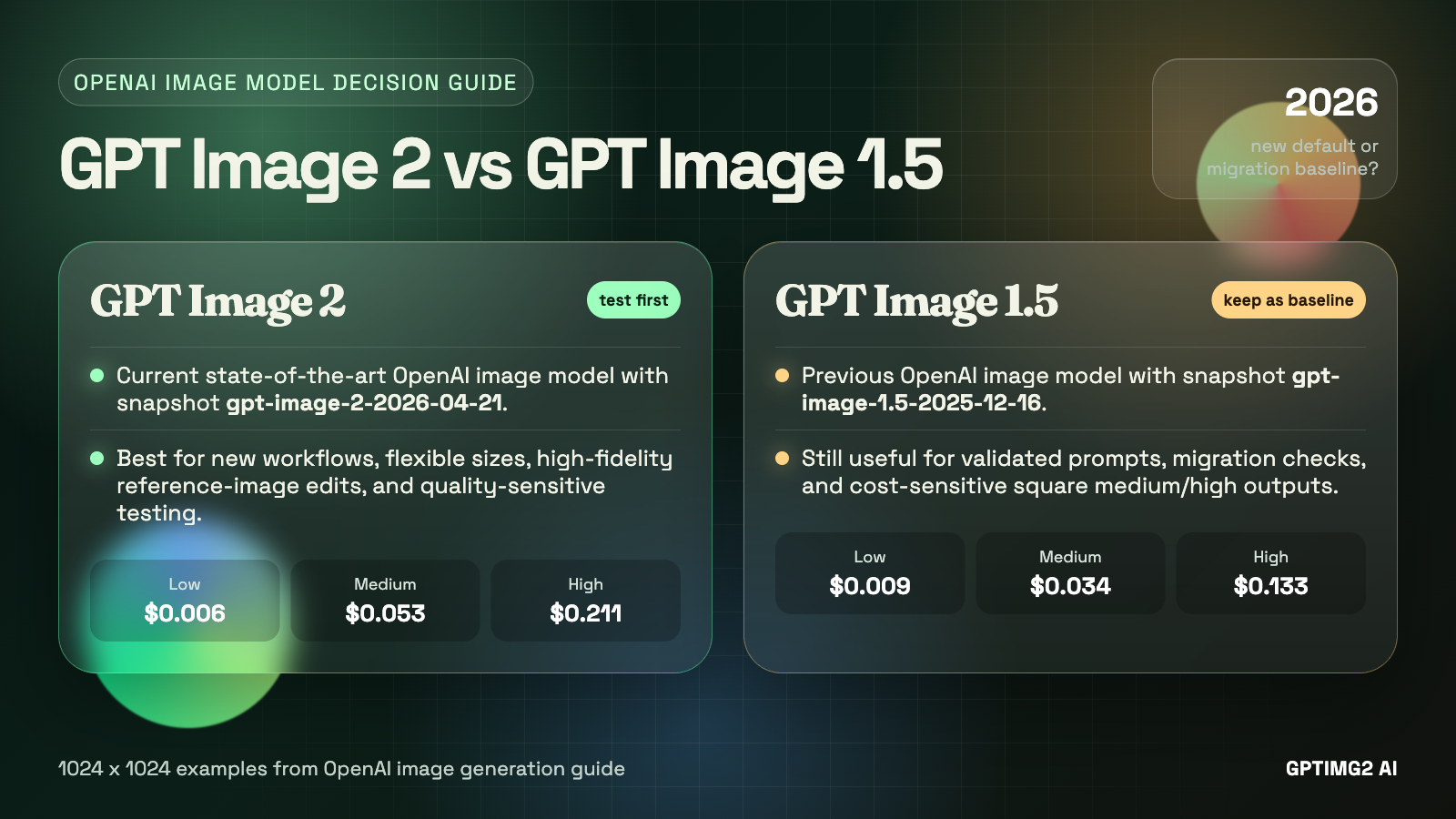
GPT Image 2 is the stronger default for new tests, while GPT Image 1.5 remains useful as a migration baseline and cost-sensitive fallback.
Quick verdict
- Choose
GPT Image 2first for new image workflows, especially when you care about the newest OpenAI image stack, flexible resolution choices, high-fidelity image inputs, and direct generation or edit workflows. - Keep
GPT Image 1.5available for legacy prompts, stable production recipes, and cost-sensitive medium or high 1024x1024 jobs where the older model is already good enough. - Do not treat GPT Image 2 as a no-retry replacement for text-heavy layouts, recurring characters, or exact brand systems. OpenAI's own image guide still keeps those limitations on the table for GPT Image models.
In short: GPT Image 2 is the right default for exploration and new production tests. GPT Image 1.5 is the right control group for migration.
What each model is now
The official model pages make the current hierarchy clear.
GPT Image 2 is OpenAI's current state-of-the-art image generation model. The model page positions it for fast, high-quality image generation and editing, with text and image input, image output, flexible image sizes, and high-fidelity image inputs. It also exposes the snapshot gpt-image-2-2026-04-21, which matters if your team needs to pin behavior instead of chasing a moving alias.
GPT Image 1.5 is now described by OpenAI as the previous image generation model. It still matters because it has a dated snapshot, gpt-image-1.5-2025-12-16, and many teams may already have prompts, fallback rules, and QA expectations built around it.
That gives the comparison a cleaner shape:
| Decision point | GPT Image 2 | GPT Image 1.5 |
|---|---|---|
| Current official role | State-of-the-art image generation model | Previous image generation model |
| Snapshot | gpt-image-2-2026-04-21 | gpt-image-1.5-2025-12-16 |
| Inputs | Text and image | Text and image |
| Outputs | Image | Image, and the model page also lists text output |
| Core fit | New production testing, higher-quality generation, flexible output sizing, high-fidelity edits | Legacy production baselines, validated prompts, controlled migration comparisons |
| Main caution | New model behavior still needs prompt-set testing | Older model can be cheaper in some output examples and may be more predictable for existing workflows |
The important point is that this is not a rumor-versus-current-model comparison. It is a current frontier model versus the previous production baseline.
Pricing is not a simple upgrade story
A newer model is not automatically cheaper at every quality tier.
OpenAI's pricing page lists image generation model prices by tokens, and the standard image output token price is slightly lower for gpt-image-2 than for gpt-image-1.5: $30.00 / 1M image output tokens for GPT Image 2 versus $32.00 / 1M for GPT Image 1.5. Both show the same standard image input token price at $8.00 / 1M.
But the per-image examples in the image generation guide make the decision more nuanced. For the shared 1024x1024 examples:
| Quality | GPT Image 2 | GPT Image 1.5 | Practical read |
|---|---|---|---|
| Low | $0.006 | $0.009 | GPT Image 2 is cheaper for rough square drafts. |
| Medium | $0.053 | $0.034 | GPT Image 1.5 is cheaper for the common middle tier. |
| High | $0.211 | $0.133 | GPT Image 1.5 is cheaper for high-quality square output. |
For portrait and landscape examples, GPT Image 2 looks better at some listed sizes: 1024x1536 and 1536x1024 are shown at $0.041 medium and $0.165 high for GPT Image 2, compared with $0.05 medium and $0.20 high for GPT Image 1.5. GPT Image 2 also supports many additional valid resolutions under documented constraints, while GPT Image 1.5 stays closer to the legacy size table.
So the pricing answer is not "GPT Image 2 is cheaper" or "GPT Image 1.5 is cheaper." It is:
- GPT Image 2 can be cheaper for low-quality square drafts and some non-square examples.
- GPT Image 1.5 can be cheaper for medium and high square outputs.
- GPT Image 2 may still be worth the higher square cost when the task needs frontier quality, more resolution flexibility, or high-fidelity image input behavior.
If your team generates many square medium-quality images, do not migrate on model name alone. Compare actual request costs and retry rates.
GPT Image 2 is the stronger default for new work
For new projects, GPT Image 2 should usually be the first model you test.
The reason is not just that it is newer. It is that the surrounding control surface is more aligned with how image work is moving: higher-fidelity reference inputs, flexible sizing, explicit quality levels, and direct generation/edit endpoints. That matters for real creative systems where one request may be a cheap composition draft and another may be a final marketing asset.
GPT Image 2 is especially attractive for:
- product visuals where the brief is detailed and the output has to feel current
- marketing images that need stronger instruction following and stronger visual polish
- UI-style mockups where layout, hierarchy, and text blocks are part of the creative target
- image editing workflows that start from one or more reference images
- teams that want a dated snapshot for reproducibility while still using the newest OpenAI image model
Inside GPTIMG2 AI, the practical route is simple: use the GPT Image 2 app workspace when the brief is already clear, or start from the GPT Image 2 prompts page when you need a stronger structure before spending credits.
The upgrade case is strongest when you are not protecting an old workflow. If the prompt set is new, the review rubric is new, and the output will be judged against current image-model expectations, GPT Image 2 deserves the first slot.
GPT Image 1.5 still has a job
GPT Image 1.5 is not irrelevant just because GPT Image 2 is now public.
The first reason is production inertia. A prompt that has already been tested against GPT Image 1.5 is not just a prompt. It is a working recipe: prompt wording, aspect ratio, quality setting, expected failure modes, retry count, manual review criteria, and sometimes downstream editing steps. Replacing the model changes that recipe.
The second reason is cost. In the official 1024x1024 examples, GPT Image 1.5 is cheaper at medium and high quality. If your workload is mostly square outputs and your current results already pass review, GPT Image 1.5 may remain a rational default for that slice.
The third reason is baseline value. GPT Image 1.5 gives you a clean comparison point. When you test GPT Image 2, you should not only ask whether the new image is prettier. You should ask whether it reduces retries, preserves instructions better, handles reference images more usefully, or improves the specific quality metric your team cares about.
Use the existing GPT Image 1.5 model page as the baseline route when you need to compare older OpenAI image behavior before moving a workflow fully to GPT Image 2.
Text rendering and layout control are still not solved automatically
The most dangerous migration mistake is assuming GPT Image 2 removes all old GPT Image failure modes.
OpenAI's image generation guide still warns that GPT Image models can struggle with precise text placement and clarity. It also calls out recurring-character or brand consistency and precise composition control as areas that can still fail. Complex prompts may take up to 2 minutes.
That warning applies to the family, not only to GPT Image 1.5.
For practical work, treat GPT Image 2 as a better candidate, not as a guarantee. For text-heavy outputs, test the exact jobs you care about:
- landing page mockups with readable headings and buttons
- product ads with exact offer copy
- poster layouts with clear title/subtitle hierarchy
- bilingual or multilingual graphics
- UI screens with dense labels and navigation
- branded templates that require repeated logo or character consistency
A useful test should compare failure modes, not only best outputs. If GPT Image 2 creates a stronger first image but still needs the same number of retries to fix text, the operational win may be smaller than it looks. If it reduces retries from four to one on a structured layout, then the higher output price may be worth it.
Editing workflows are where GPT Image 2 is easiest to justify
GPT Image 2 has a clearer upgrade argument when the task includes reference images.
The GPT Image 2 model page explicitly calls out high-fidelity image inputs. The image generation guide also notes that GPT Image 2 always processes image inputs at high fidelity, which can increase input-token usage for edit requests with reference images. That is a cost warning, but it is also a workflow clue: OpenAI expects GPT Image 2 to be used seriously for image-conditioned work.
That makes GPT Image 2 a better first test for:
- preserving a product while changing the scene
- keeping a person or object recognizable while changing styling
- turning a rough creative into a more polished composition
- editing a marketing image without rebuilding the whole asset
- using reference images as constraints rather than loose inspiration
GPT Image 1.5 can still handle image input and edits, but GPT Image 2 is the model to prioritize when the reference image is central to the job. Just remember to include input-image token cost in your estimate, especially for high-fidelity edits.
A safe migration plan from GPT Image 1.5 to GPT Image 2
Do not migrate every image workflow in one pass. Split the decision by job type.
1. Keep GPT Image 1.5 as the control group
Take your existing GPT Image 1.5 prompts and run them unchanged first. This tells you whether GPT Image 2 improves the old workflow without prompt adaptation.
Then run a second pass with GPT Image 2-specific prompt cleanup. Newer models often reward clearer constraints, not just longer prompts.
2. Separate draft quality from final quality
Test low, medium, and high quality separately. GPT Image 2 low is attractive for drafts, but GPT Image 1.5 may remain cheaper at square medium/high outputs. Do not average those jobs together.
3. Score outcomes by production criteria
Use a simple rubric:
| Criterion | What to check |
|---|---|
| Prompt adherence | Did the model follow all non-negotiable details? |
| Text quality | Is the visible text readable and placed correctly? |
| Layout structure | Does the image preserve hierarchy, spacing, and composition? |
| Reference-image fidelity | Does the edited output keep the right subject identity? |
| Retry count | How many attempts before the image is usable? |
| Total cost | What did the usable image cost after retries and edits? |
The winning model is the one that produces usable assets with fewer operational compromises, not necessarily the one that produces the most impressive isolated sample.
4. Migrate high-upside jobs first
Move these jobs to GPT Image 2 first:
- new prompt-library experiments
- high-value marketing assets
- complex editing tasks
- UI or poster concepts where layout quality matters
- workflows where flexible resolution is useful
Keep these on GPT Image 1.5 until tested:
- stable recurring image templates
- cost-sensitive square medium/high outputs
- prompts that already pass review with low retry rates
- workflows where output consistency matters more than frontier quality
Which model should you use first?
Use GPT Image 2 first when:
- the project is new
- the brief is complex
- reference images matter
- visual quality matters more than the cheapest medium/high square output
- flexible sizing helps the final deliverable
- you want to align with OpenAI's current image-generation model
Use GPT Image 1.5 first when:
- the prompt is already validated on GPT Image 1.5
- the output is a square medium/high image and price sensitivity is real
- you need a known baseline for comparison
- your workflow already has review rules and fallback prompts built around GPT Image 1.5
- migration risk matters more than testing the newest model
For most teams, the right answer is not one global switch. It is a routing rule:
GPT Image 2 for new and quality-sensitive work. GPT Image 1.5 for proven legacy flows until GPT Image 2 beats it on your own prompts.
Final verdict
GPT Image 2 should become the first model you test for new OpenAI image-generation workflows. It is now the public state-of-the-art model, supports a newer snapshot, offers broader sizing flexibility, and is better aligned with high-fidelity image input and modern editing workflows.
GPT Image 1.5 should remain in your stack as a baseline and fallback. It is still useful when prompts are already validated, when square medium/high output cost matters, or when you need to measure whether GPT Image 2 actually improves the whole production loop instead of only improving isolated samples.
If you are starting fresh, open the GPT Image 2 workspace and test your real brief there. If you need better starting prompts before testing, use the GPT Image 2 prompts page. If you are migrating an existing workflow, keep the GPT Image 1.5 page as your baseline and compare prompt-by-prompt.
Start from the GPT Image 2 page
If you want to move from comparison to testing, start on the GPT Image 2 page first. It gives you the shortest path into the current image workflow, prompt library, and model-specific workspace.
Open the GPT Image 2 page
FAQ
Is GPT Image 2 officially available now?
Yes. OpenAI now publicly lists gpt-image-2 and the dated snapshot gpt-image-2-2026-04-21 on its model page.
Is GPT Image 2 always better than GPT Image 1.5?
No. GPT Image 2 is the newer state-of-the-art model, but your production winner depends on prompt adherence, retry count, output cost, reference-image behavior, and the kind of image you need.
Is GPT Image 2 cheaper than GPT Image 1.5?
Not always. GPT Image 2 is cheaper in the official 1024x1024 low-quality example, but GPT Image 1.5 is cheaper in the 1024x1024 medium and high examples. Compare the exact sizes and quality tiers your workflow uses.
Should I replace GPT Image 1.5 with GPT Image 2?
For new workflows, start with GPT Image 2. For existing production workflows, run GPT Image 2 against your current GPT Image 1.5 prompts first, then migrate only the jobs where it improves quality, retry count, or total cost.