Melhores prompts para GPT Image 2: 12 exemplos prontos
Veja 12 melhores prompts para GPT Image 2 no GPTIMG2 AI, com imagens e estruturas prontas para anúncios, UI, pôsteres, e-commerce e infográficos.
Se você está procurando os melhores prompts para GPT Image 2, provavelmente não quer só uma lista de adjetivos genéricos. Um bom prompt precisa funcionar como briefing: tipo de peça, assunto, composição, texto que deve aparecer, restrições e uso final.
Os 12 exemplos abaixo vêm da biblioteca de prompts GPT Image 2 do GPTIMG2 AI. Eles foram escolhidos pela estrutura, não apenas pela aparência. Os blocos de prompt ficam em inglês porque são comandos prontos para copiar e usar diretamente no gerador.
O que faz um prompt de GPT Image 2 funcionar bem
Um prompt forte costuma ter cinco camadas:
- Tipo de entrega: pôster, página de produto, mockup de UI, ficha técnica, infográfico, anúncio.
- Assunto: produto, pessoa, lugar, objeto ou sistema.
- Composição: posição do elemento principal, divisão da tela, espaço em branco e proporção.
- Sistema visual: luz, paleta, tipografia, textura, câmera ou linguagem de marca.
- Restrições: texto legível, elementos a preservar, erros a evitar e qualidade esperada.
Esses exemplos são úteis porque descrevem uma peça real, não apenas um clima visual.
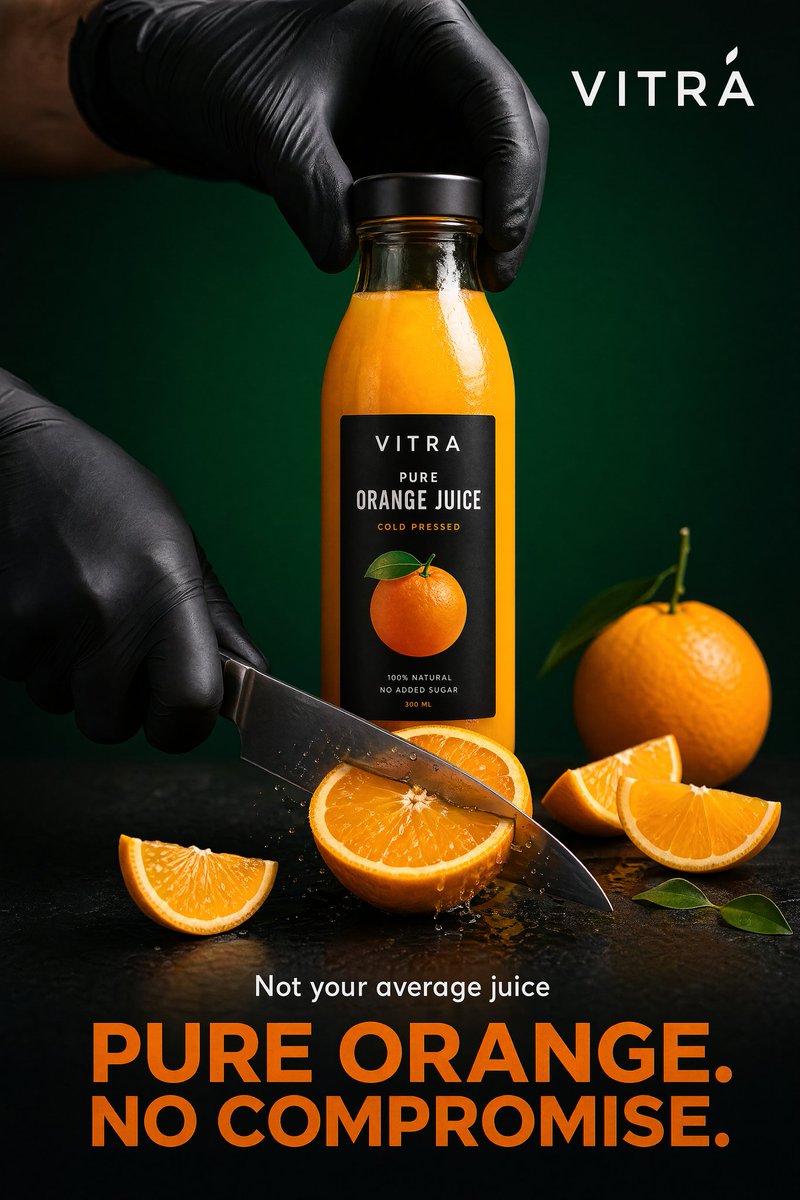
1. Anúncio premium de garrafa de suco de laranja
Crie um pôster comercial ousado e sofisticado para uma marca premium de suco de laranja, criado em um ambiente de estúdio hiper-realista com forte ênfase em frescor, precisão e apelo visual impressionante.
Composição principal:
Uma elegante garrafa transparente cheia de suco de laranja rico e vibrante fica no centro. A etiqueta é minimalista, moderna e premium, apresentando um gráfico laranja limpo com tipografia refinada. O frasco é coberto por uma tampa preta fosca, realçada por destaques sutis e reflexos realistas.
Ação e história:
Duas mãos usando luvas pretas foscas interagem com o produto:
Uma mão segura firmemente a garrafa por cima
A outra corta uma laranja grossa e suculenta usando uma faca afiada de aço inoxidável
O corte é capturado no meio da ação, apresentando a polpa suculenta e a textura cítrica fresca. Algumas rodelas de laranja são colocadas na base, levemente espalhadas para criar uma composição natural, mas com estilo.
Iluminação e ambiente:
Plano de fundo: gradiente verde rico e profundo com queda cinematográfica
Superfície: mesa escura fosca com reflexos suaves e controlados
Iluminação: configuração dramática de estúdio
Luz principal forte de um lado para profundidade
Luz de preenchimento suave para equilíbrio
Destaques nítidos na garrafa e na faca
Sombras profundas e limpas para contraste
Layout de tipografia:

Canto superior:
Marca limpa e moderna (por exemplo, “VITRA”, “FRESCO” ou “NATURO”) em branco
Seção inferior:
Linha pequena: “Not your average juice”

Título grande e em negrito: “PURE ORANGE. NO COMPROMISE.”
A tipografia deve parecer moderna, ousada e premium, com uma forte hierarquia visual. Use um rico tom laranja no título para complementar o suco.

Estilo Visual:

Estética publicitária de alimentos de alta qualidade

Cinematográfico, ousado e baseado em contraste

Detalhes e texturas ultranítidos

Aparência editorial premium (como uma campanha global)

Composição limpa, mas poderosa

Requisitos de saída:

Resolução 4K

Qualidade fotorrealista e de nível publicitário

Foco nítido, contraste rico, alta faixa dinâmica
2. Homepage SaaS moderna com boards de design
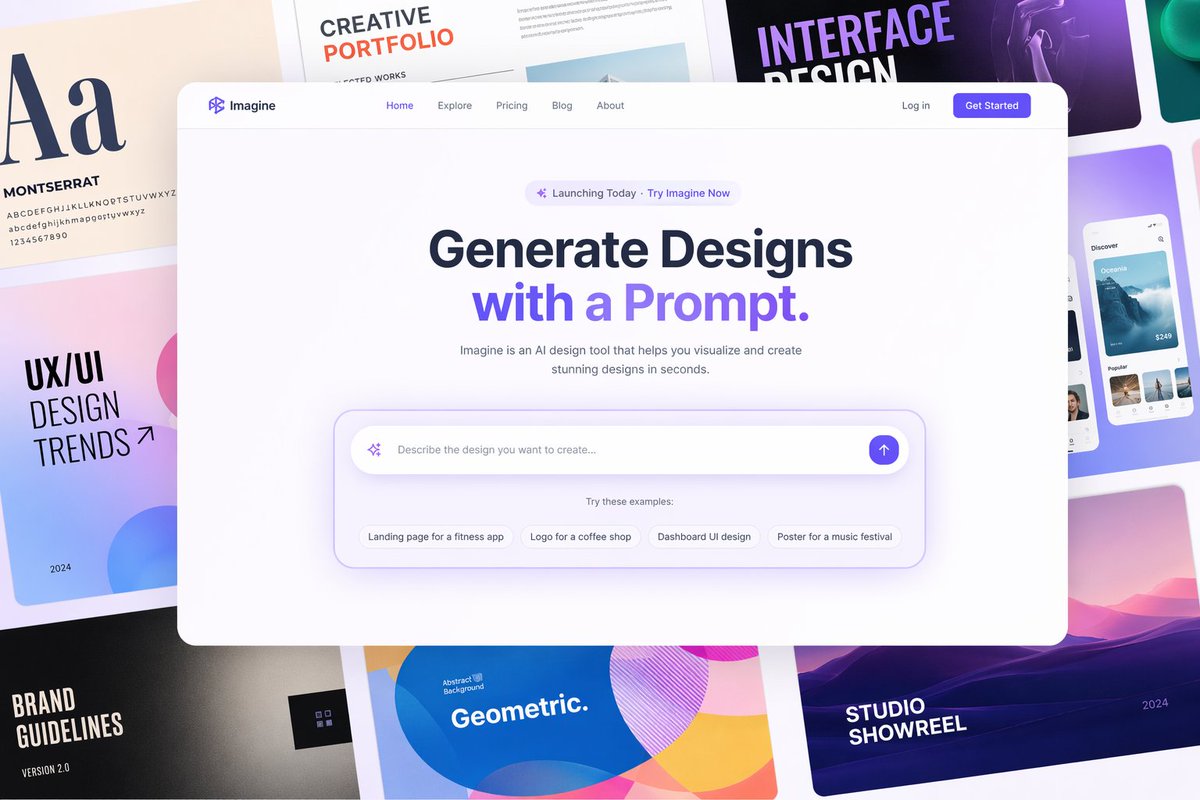
homepage de site SaaS moderno, estilo figma, barra de navegação limpa, seção principal com interface de entrada de prompt flutuante, card com cantos arredondados, sombra suave, design minimalista

fundo preenchido com quadros de design criativos e coloridos, layouts de portfólio, pôsteres de tipografia, mockups de UI, composição em grade

composição centralizada, espaçamento elegante, design de UI premium, iluminação suave, profundidade sutil, página de destino de produto, 8k, ultra limpo
3. Pôster urbano Boston Spring 2026
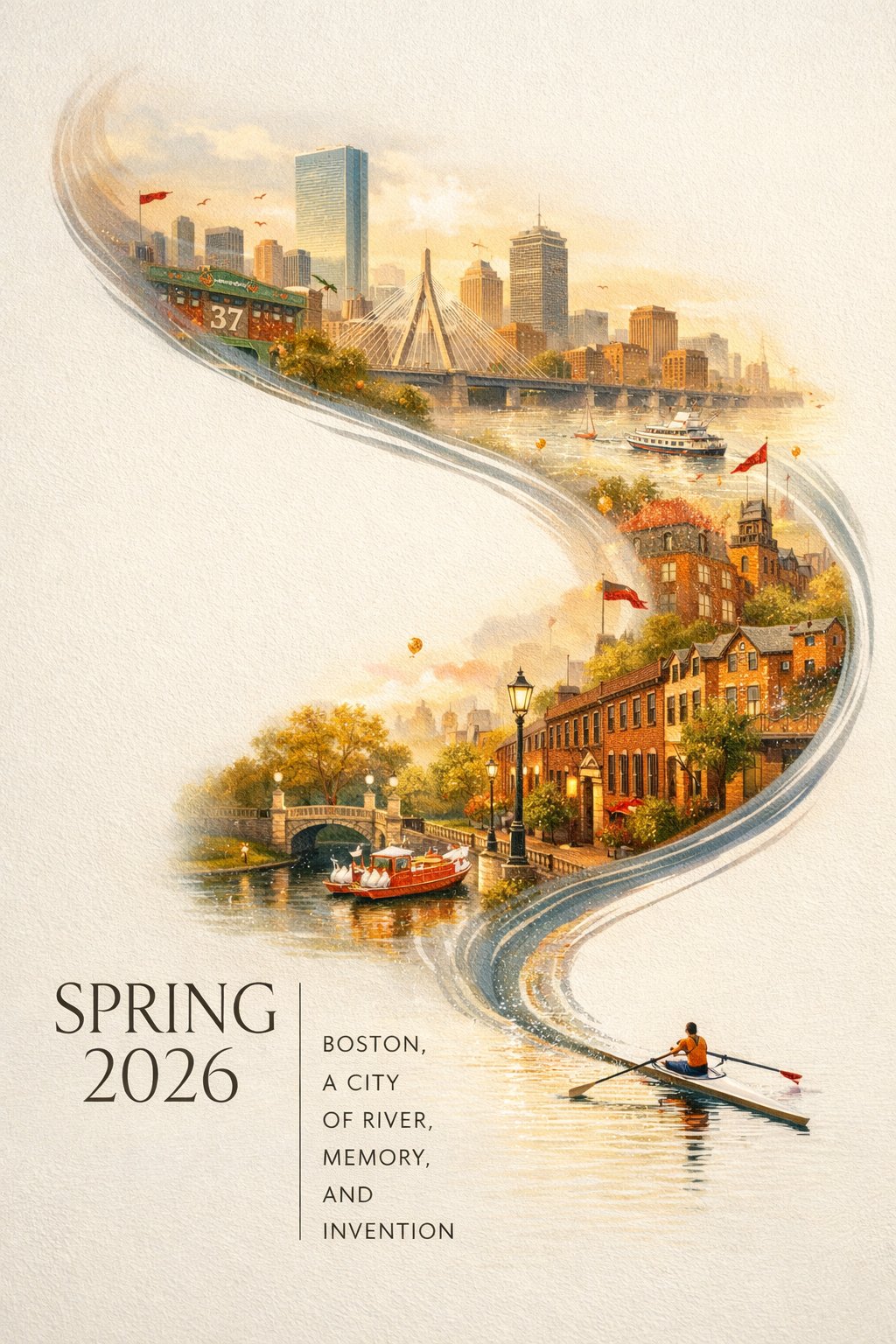
Um impressionante pôster da cidade de Boston para a Primavera de 2026, com um clima elegante e festivo e um design contemporâneo arrojado. Em um fundo texturizado off-white limpo com grandes áreas de espaço negativo, um remador solitário em um skiff atravessa o canto inferior direito da imagem em uma estreita faixa de água reflexiva. O rastro do remo sobe em uma curva caligráfica dinâmica, transformando-se gradualmente no Rio Charles e depois em um panorama onírico pintado à mão de Boston. Dentro desta composição em forma de rio, estão elementos icônicos de Boston: o horizonte de Back Bay, os brownstones de Beacon Hill, a Acorn Street, o Boston Public Garden, os barcos de cisne, a Zakim Bridge, detalhes inspirados em Fenway, arquitetura histórica de tijolos, balsas do porto e a atmosfera da orla da cidade. Névoa suave da manhã, luz dourada de primavera, toques festivos sutis em carmesim e dourado, detalhes ricos, profundidade em camadas, estética sofisticada de pôster urbano, fresco e refinado, visualmente poderoso, mas não sobrecarregado. Tipografia elegante no canto inferior esquerdo diz “SPRING 2026” com um slogan vertical “BOSTON, A CITY OF RIVER, MEMORY, AND INVENTION”, texto claro e belamente composto, design gráfico premium, 9:164. Mapa gastronômico ilustrado de Chengdu
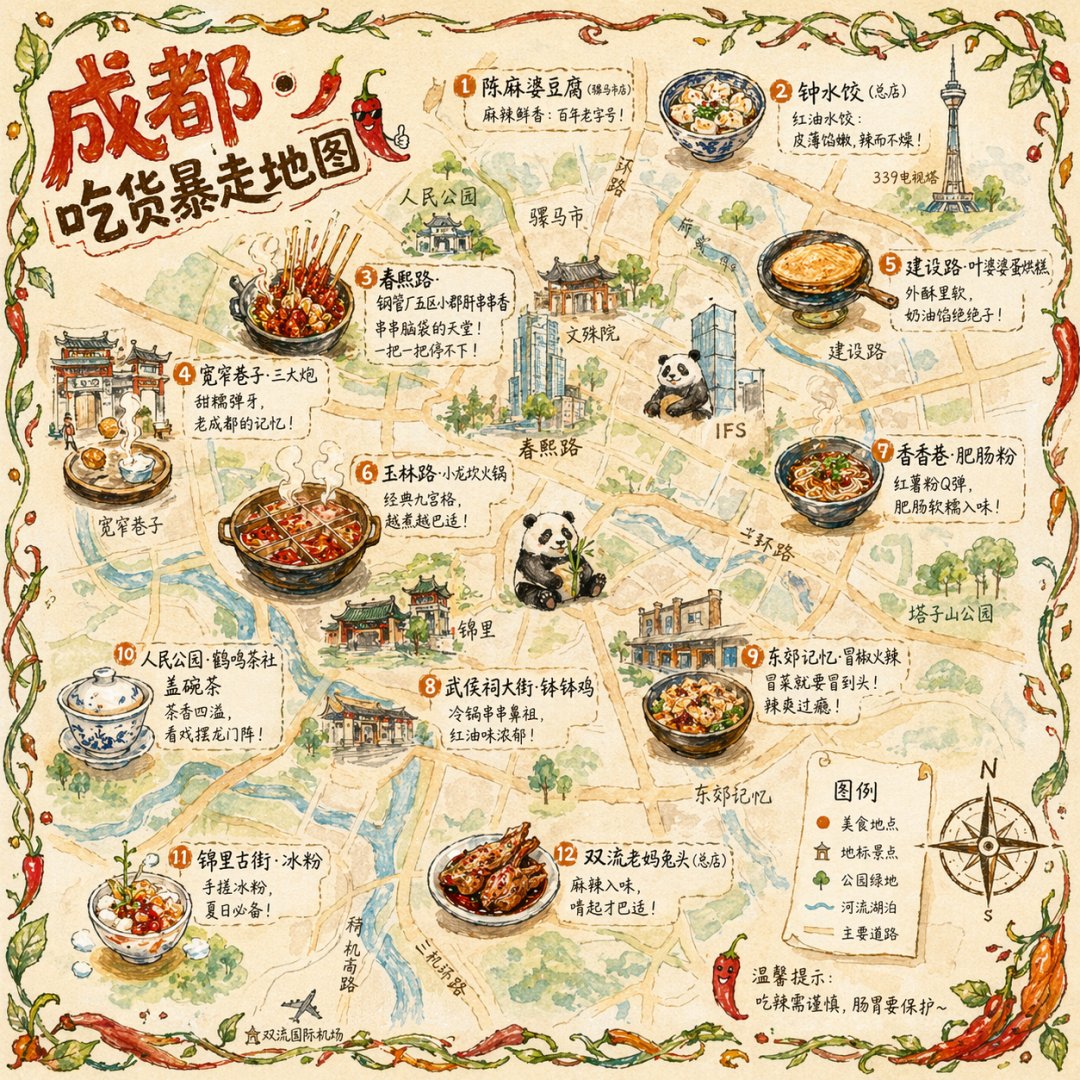
Crie um mapa gastronômico da cidade desenhado à mão com o tema de Chengdu. Use um mapa ilustrado da cidade em vista aérea como base, mostrando as principais estradas e pontos turísticos de forma simplificada, priorizando um estilo fofo desenhado à mão em vez de precisão geográfica rigorosa. Distribua 12 pontos gastronômicos ilustrados e refinados pelo mapa: por exemplo, espetinhos na Chunxi Road com ingredientes fumegantes em palitos de bambu, os três bolinhos de arroz 'cannonball' na Kuanzhai Alley voando em direção a um prato de latão, uma panqueca de ovo dourada na Jianshe Road sendo virada e um hotpot de nove divisões borbulhando na Yulin Road. Cada ilustração de comida deve ocupar cerca de 5% da área do mapa. Ao lado de cada uma, adicione o nome do estabelecimento escrito à mão e uma breve linha de recomendação, como “o lugar que ainda tem fila às 2 da manhã”. Decore a borda com vinhas e pimentas desenhadas à mão. Adicione uma bússola e uma legenda desenhadas à mão no canto inferior direito. No canto superior esquerdo, defina o título como “Chengdu Foodie Rampage Map” em letras grossas desenhadas à mão com detalhes de pimenta. O estilo visual geral deve misturar texturas de aquarela e lápis de cor, com uma paleta quente centrada no vermelho pimenta, amarelo gengibre e verde fresco. Proporção 1:1.5. Infográfico Hanfu com estética de museu
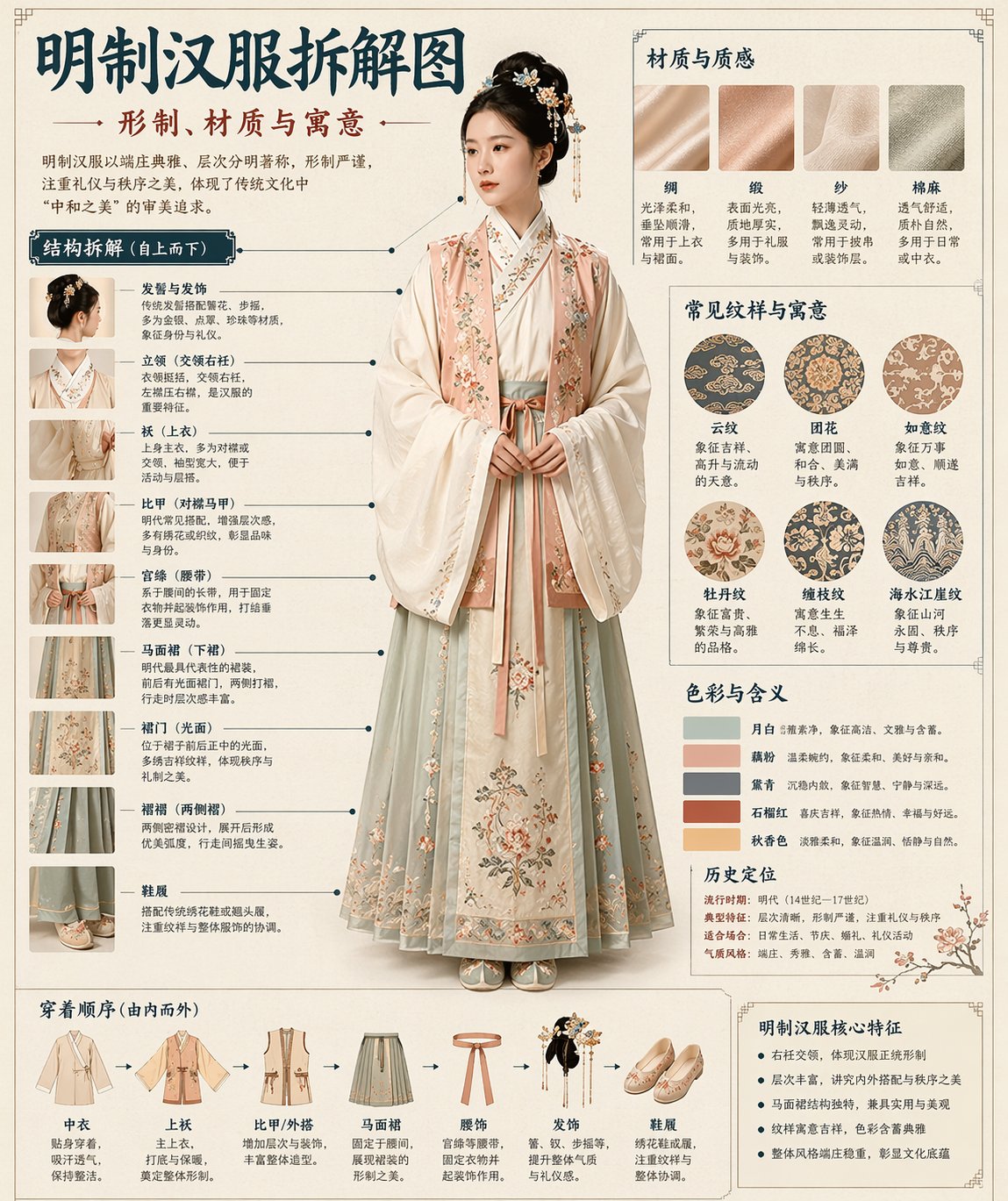
Com base no assunto escolhido, gere automaticamente um infográfico de decomposição chinesa no estilo de museu. A imagem deve combinar um visual principal realista, análise estrutural explodida, etiquetas explicativas em chinês, notas sobre materiais, simbolismo de padrões, significados das cores e um resumo conciso das características principais. Você deve inferir o objeto principal, sistema de vestuário, estrutura do artefato, estilo de época, componentes importantes, artesanato do material, esquema de cores e lógica de layout mais adequados a partir do próprio assunto, para que o usuário não precise fornecer nada extra. O estilo geral deve parecer um painel de exposição de um Museu Nacional, uma placa de referência de figurino histórico ou um infográfico de patrimônio cultural, não um pôster padrão, retrato de figurino, página de detalhes de e-commerce ou ilustração de anime. Use tons de fundo semelhantes a papel, como marfim, branco seda ou chá pálido, e mantenha o design elevado, contido, profissional e colecionável. Use um layout fixo: Topo: Título principal em chinês + subtítulo + introdução; Esquerda: zona de decomposição estrutural com linhas de chamada em chinês e componentes-chave rotulados, além de detalhes em close-up; Superior direito: zona de material/artesanato/textura com amostras de textura realistas e notas; Médio direito: zona de motivo/cor/simbolismo com uma paleta principal, amostras de padrões e interpretação cultural; Inferior: ordem de vestimenta/fluxo de construção + resumo das características principais. Se o assunto for melhor expresso através de uma pessoa, mostre uma figura realista de corpo inteiro como sujeito central. Se for melhor expresso como um artefato ou objeto independente, use um diagrama explodido centralizado, mantendo a forma geral como um infográfico chinês completo. Todo o texto deve estar em chinês simplificado, claro, ordenado e legível. Sem caracteres corrompidos, erros de digitação, inglês ou pinyin. Enfatize a estrutura autêntica, diferenças de material, explicação cultural e a sensação de um verdadeiro gráfico de referência ilustrado. Evite estilo de pôster, estilo de foto de estúdio, estilo de e-commerce, estilo de anime, estilo de cosplay, etiquetas bagunçadas, estruturas incorretas, texto borrado, materiais falsos e decoração excessiva.6. Feed social imaginário da dinastia Song
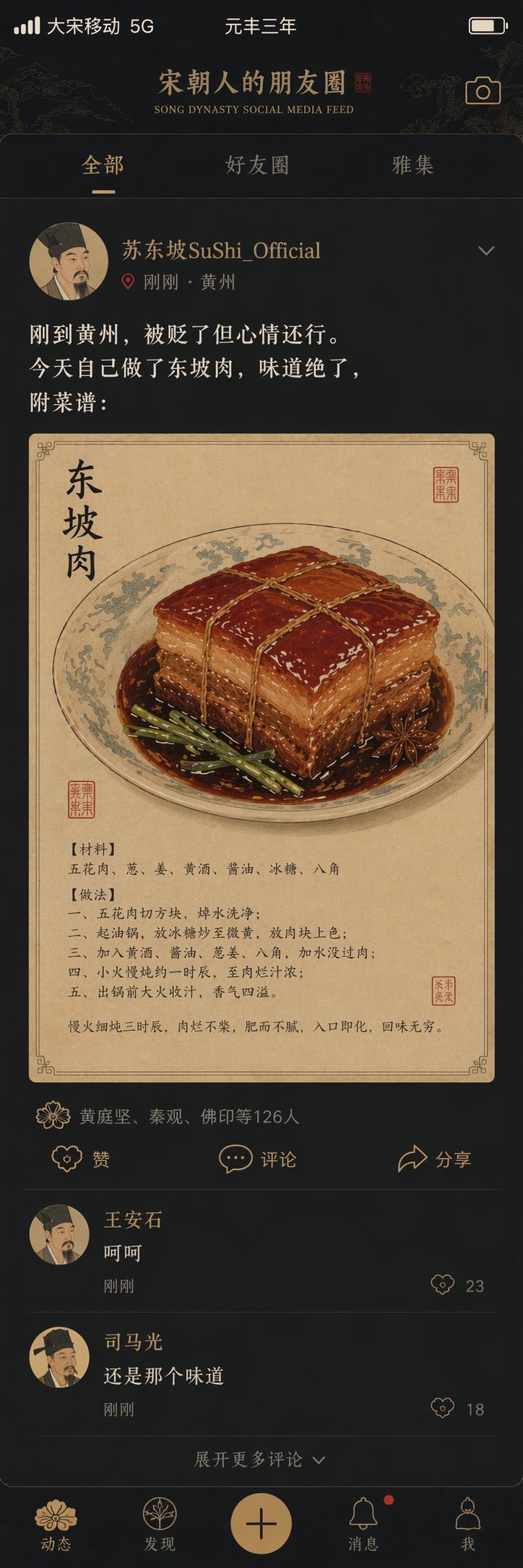
Crie um design de interface chamado “Song Dynasty Social Media Feed”, misturando a China histórica com o humor moderno das redes sociais. A imagem deve simular uma interface de rede social de smartphone, mas todo o conteúdo deve ser da Dinastia Song. Use um retrato de um estudioso do período Song como avatar. O nome de usuário deve ser “Su Dongpo / SuShi_Official”. O texto da postagem deve dizer: “Acabei de chegar em Huangzhou. Fui rebaixado, mas meu humor ainda está bom. Hoje eu mesmo cozinhei a carne de porco Dongpo. Ficou incrível. Receita em anexo:”. A imagem anexada deve ser um close-up em estilo gongbi da carne de porco Dongpo. A lista de curtidas deve dizer “Huang Tingjian, Qin Guan, Foyin e outros 126”. Os comentários devem incluir frases como “Wang Anshi: hehe” e “Sima Guang: ainda com o mesmo sabor”. Substitua ícones sociais padrão, como o ícone de curtir, por padrões decorativos no estilo Song. A barra de status deve ler “Great Song Mobile 5G” e “Yuanfeng Year Three”. Use uma paleta de smartphone em modo escuro combinada com cores elegantes da Dinastia Song, e faça com que a imagem inteira pareça uma colisão espirituosa entre história e redes sociais.7. Infográfico educacional desenhado à mão
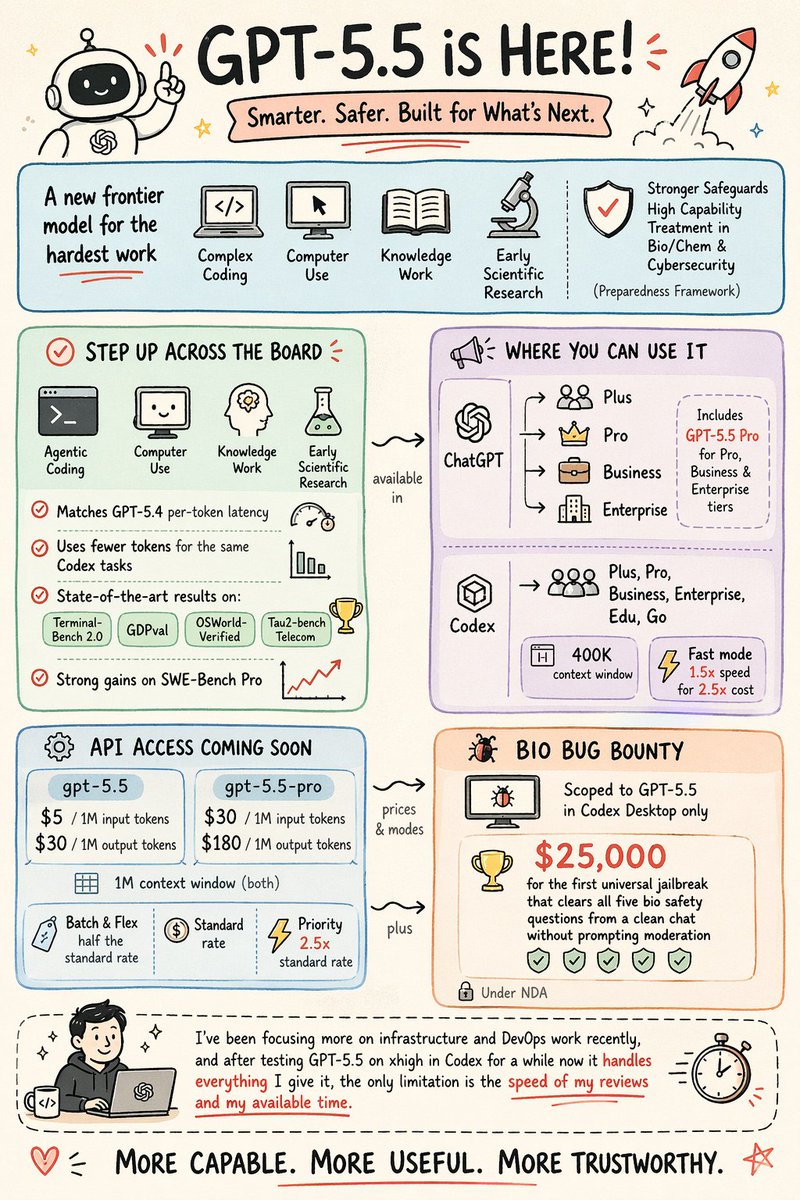
Crie um infográfico educacional desenhado à mão de uma página.

Estilo:
Fundo de papel creme quente (#F5F0E8), estilo de nota de desenho limpo com leve oscilação desenhada à mão. Sem elementos realistas. Parece um resumo de slides de alta qualidade.

Cor:
Use cartões arredondados em tons pastéis para as seções:
azul claro #A8D8EA, menta #B5E5CF, lavanda #D5C6E0, pêssego #F4C7AB.
Use vermelho coral #E8655A para destaques (palavras-chave, dados principais, marcas de seleção).
Texto principal e contornos em preto, anotações em cinza quente #6B6B6B.

Projeto:
Visual em primeiro lugar. Use ícones, rabiscos e diagramas simples em vez de texto.
Estrutura clara à primeira vista (fluxo, comparação, cartões agrupados, etc.).
Separe seções com caixas arredondadas, bolhas ou quadros tracejados.
Conecte as seções com setas onduladas desenhadas à mão + rótulos curtos.

Tipografia:
Título centralizado em negrito desenhado à mão na parte superior.
Seções internas: palavras-chave em negrito + pequenos rótulos cinza (2–5 palavras).

Detalhes:
Preenchimento de cor ligeiramente imperfeito (não totalmente dentro dos contornos).
Adicione pequenos rabiscos (estrelas, setas, sublinhados).
Mantenha bastante espaço em branco e layout limpo.

Rodapé:
Adicione uma frase em negrito centralizada na parte inferior.

Conteúdo:
<insira seu conteúdo aqui>
8. Dieline de embalagem em 2D
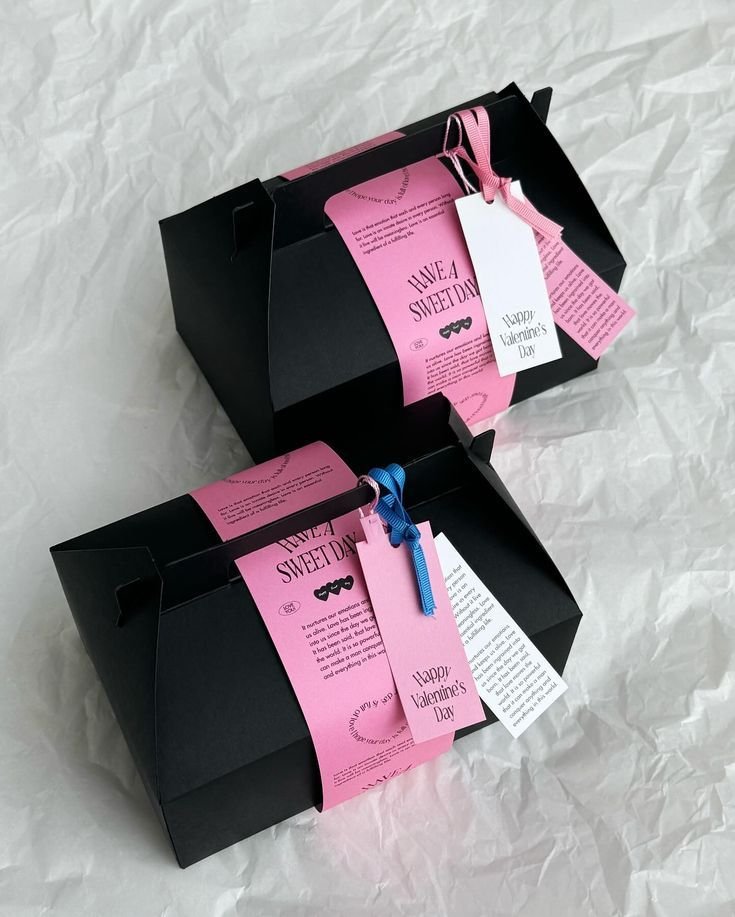
Achate a embalagem 3D em uma rede 2D. Expanda todos os painéis e guias. Projeção ortográfica, sem distorção. Mapeie texturas com precisão. Adicione linhas contrastantes. Fundo branco puro.9. Coleção de ícones de marca
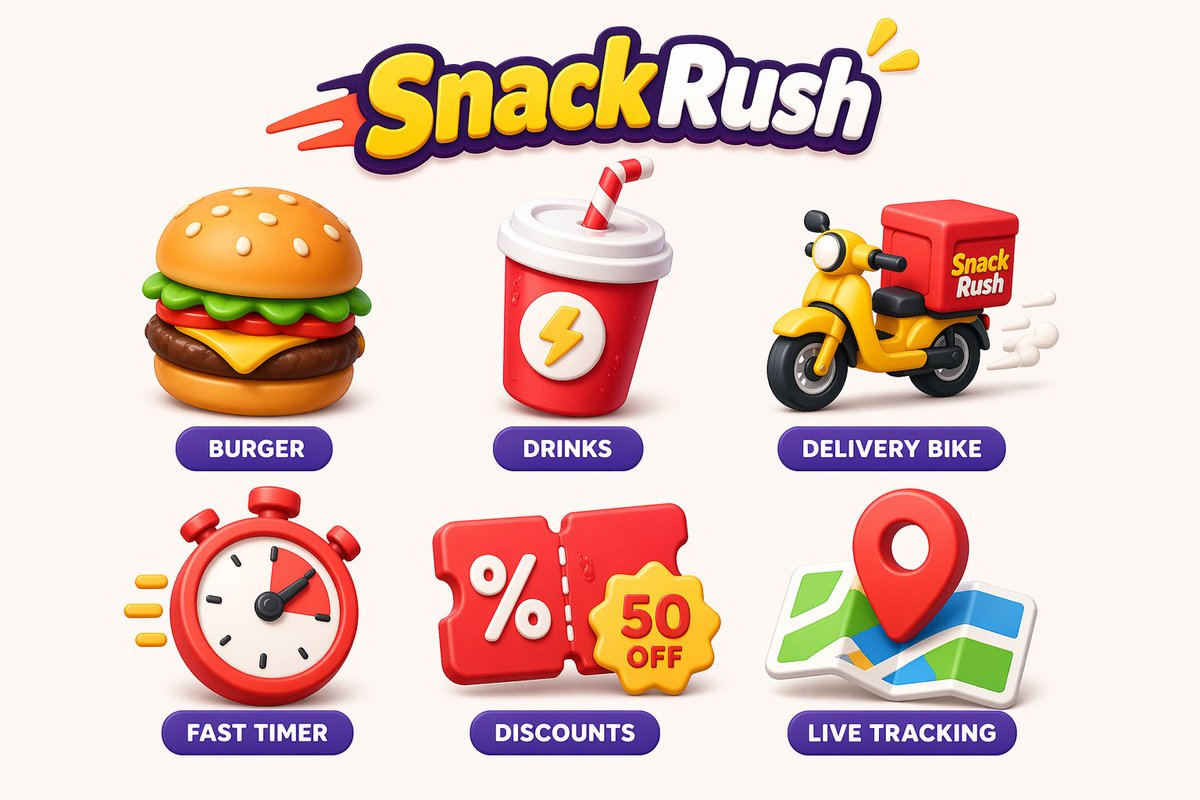
Crie uma coleção coesa de ícones divertidos para [NOME DA MARCA], uma marca de [TIPO DE MARCA/INDÚSTRIA]. O estilo deve ser [PALAVRAS-CHAVE DE ESTILO: por exemplo, arredondado, 3D, plano, desenhado à mão, mínimo] com uma paleta [ESTILO DE COR: vibrante, pastel, gradiente, monocromático]. Use [TRAÇOS DE DESIGN: sombras suaves, contornos ousados, texturas sutis, brilho, etc.] para dar uma sensação amigável e moderna. Mantenha a consistência em todos os ícones com uma grade, proporções e linguagem visual unificadas. Os ícones devem representar [LISTA DE RECURSOS/FUNÇÕES]. Garanta alta clareza, espaçamento equilibrado e design escalonável adequado para UI, aplicativos e branding.10. Ficha e-commerce de roupa em três vistas
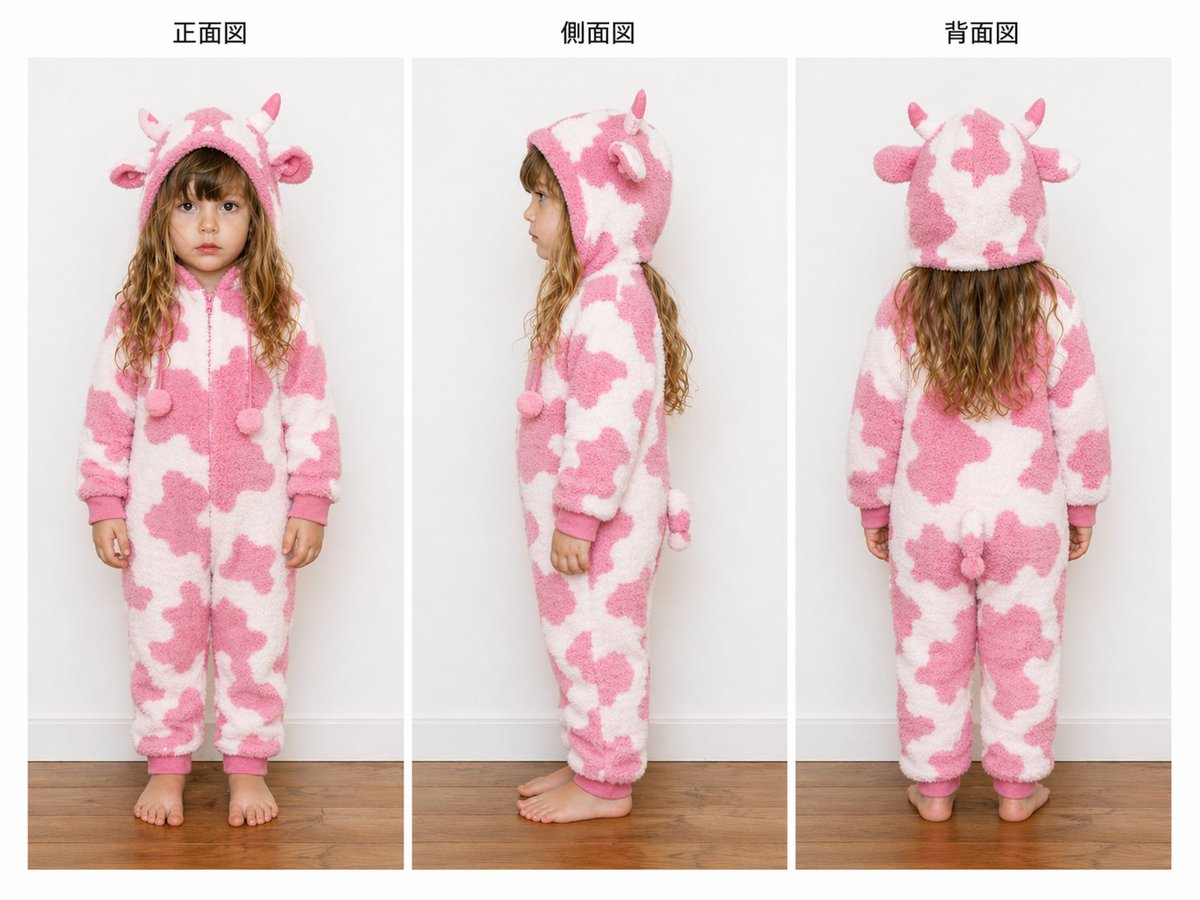
{"type":"folha de referência de turnaround de vestuário","subject":{"model":"criança pequena","gender_presentation":"menina","face":"intencionalmente anonimizado com um desfoque retangular suave sobre o rosto nas vistas frontal e lateral","hair":"cabelo longo e ondulado, do castanho claro ao loiro escuro, estendendo-se abaixo do capuz","pose_count":3},"garment":{"type":"pijama kigurumi de lã com capuz de peça única","theme":"vaquinha","primary_colors":["branco","rosa pastel"],"material":"textura de lã felpuda ou sherpa espessa","closure":"zíper frontal","fit":"ajuste folgado e confortável de corpo inteiro com punhos nos pulsos e tornozelos","details":{"hood_features_count":4,"hood_features":["2 chifres pequenos","2 orelhas arredondadas"],"front_dangling_poms_count":2,"front_dangling_poms":"dois pompons nas pontas do cordão na altura do peito","back_features_count":1,"back_features":["pequeno rabo de pelúcia"],"pattern":"manchas de vaca rosa irregulares sobre uma base branca","trim":"punhos e borda do capuz em rosa sólido"}},"layout":{"background":"interior de estúdio limpo com uma parede cinza claro e piso de madeira em tom médio quente","composition":"três painéis verticais espaçados uniformemente mostrando vistas de corpo inteiro da mesma criança vestindo o macacão","sections":[{"title":"正面図","position":"left","count":1,"labels":["vista frontal"]},{"title":"側面図","position":"center","count":1,"labels":["vista lateral"]},{"title":"背面図","position":"right","count":1,"labels":["vista traseira"]}],"panel_style":"folha de referência estilo catálogo com espaçamento branco fino entre os painéis e títulos centralizados acima de cada painel","camera":"enquadramento de corpo inteiro ao nível dos olhos, de frente","lighting":"iluminação de estúdio suave e uniforme com sombras mínimas"},"style":"fotografia de produto realista de alta resolução, estilo de documentação neutro, visibilidade clara da construção da peça, projetada como uma imagem de referência de três vistas de vestuário para e-commerce ou revisão de design","customization":{"garment color":"{argument name=\"garment color\" default=\"rosa pastel e branco\"}","animal theme":"{argument name=\"animal theme\" default=\"vaquinha\"}","model age":"{argument name=\"model age\" default=\"criança pequena\"}","headline left":"{argument name=\"headline left\" default=\"正面図\"}","headline center":"{argument name=\"headline center\" default=\"側面図\"}"}}11. Mockup de página de produto skincare premium
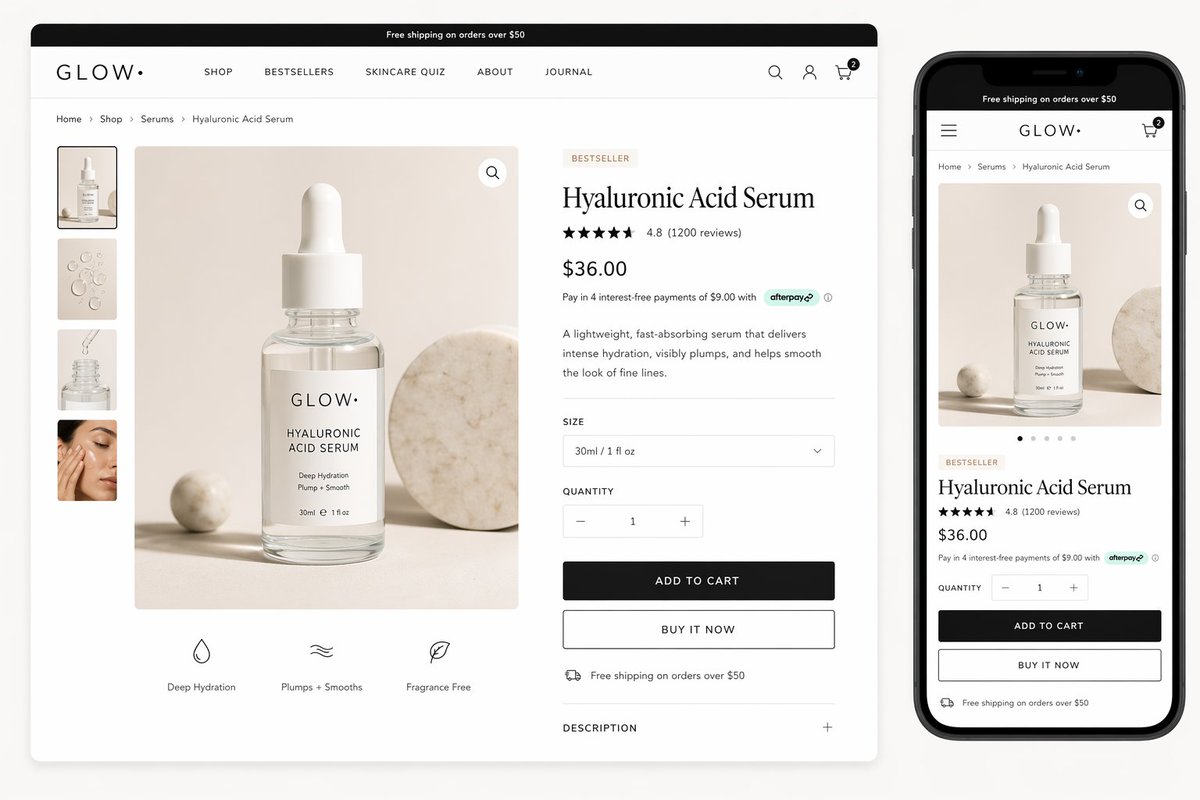
{"type":"e-commerce skincare product page mockup","brand":{"name":"GLOW.","style":"minimal luxury skincare branding"},"product":{"name":"{argument name=\"product name\" default=\"Hyaluronic Acid Serum\"}","category":"serum","price":"{argument name=\"price\" default=\"$36.00\"}","rating":{"stars":5,"score":"4.8","reviews":"(1200 reviews)"},"badge":"BESTSELLER","description":"Um sérum leve e de rápida absorção que proporciona hidratação intensa, preenche visivelmente e ajuda a suavizar a aparência de linhas finas.","size":"30ml / 1 fl oz","payment_note":"Pague em 4 parcelas sem juros de $9.00 com afterpay","benefits":["Hidratação Profunda","Preenche + Suaviza","Sem Fragrância"],"shipping_note":"Frete grátis em pedidos acima de $50"},"visual":{"primary_packshot":"frasco conta-gotas de vidro transparente com tampa branca e rótulo branco, texto minimalista preto, colocado sobre uma superfície bege quente com uma pequena esfera de pedra bege à esquerda e um grande disco de mármore redondo à direita, sombras de estúdio suaves, iluminação de anúncio de skincare premium limpa","gallery_thumbnails":{"count":4,"items":["frasco do produto de frente no cenário bege","gotas de textura de sérum em fundo bege","frasco aberto com conta-gotas de sérum acima do gargalo","desfoque suave de close-up de pele estilo de vida"]}},"layout":{"background":"fundo de estúdio cinza claro","canvas":"mockup de site desktop amplo com uma versão móvel mostrada à direita","sections":[{"title":"página de produto desktop","position":"left","count":12,"labels":["barra de frete superior","cabeçalho da marca com navegação","breadcrumb","galeria de miniaturas","imagem principal do produto","selo de mais vendido","título do produto","avaliações e notas","preço e nota de pagamento","seletor de tamanho","seletor de quantidade","botões de adicionar ao carrinho e comprar agora"]},{"title":"linha de ícones de recursos","position":"bottom-left under main image","count":3,"labels":["Hidratação Profunda","Preenche + Suaviza","Sem Fragrância"]},{"title":"prévia da página de produto móvel","position":"right","count":11,"labels":["barra de frete superior","cabeçalho móvel com menu e carrinho","breadcrumb","imagem principal do produto","pontos de carrossel","selo de mais vendido","título do produto","avaliações e notas","preço e nota de pagamento","seletor de quantidade","botões de adicionar ao carrinho e comprar agora"]}],"desktop_header":{"announcement":"Frete grátis em pedidos acima de $50","nav_items":["COMPRAR","MAIS VENDIDOS","QUIZ DE SKINCARE","SOBRE","JOURNAL"],"icons":["pesquisa","conta","carrinho com contagem de itens 2"]},"breadcrumb":["Início","Comprar","Séruns","Sérum de Ácido Hialurônico"],"mobile_header":{"announcement":"Frete grátis em pedidos acima de $50","icons":["menu","carrinho com contagem de itens 2"]}},"style":{"aesthetic":"página de produto estilo Shopify moderna e limpa","color_palette":["branco","bege suave","cinza claro","preto","pedra quente"],"typography":"título de produto serifado elegante combinado com texto de interface sans-serif minimalista","render_quality":"ultra-limpo, nítido, realista, design de e-commerce premium, alta resolução, pronto para anúncio"}}12. Pôster técnico de relógio de luxo
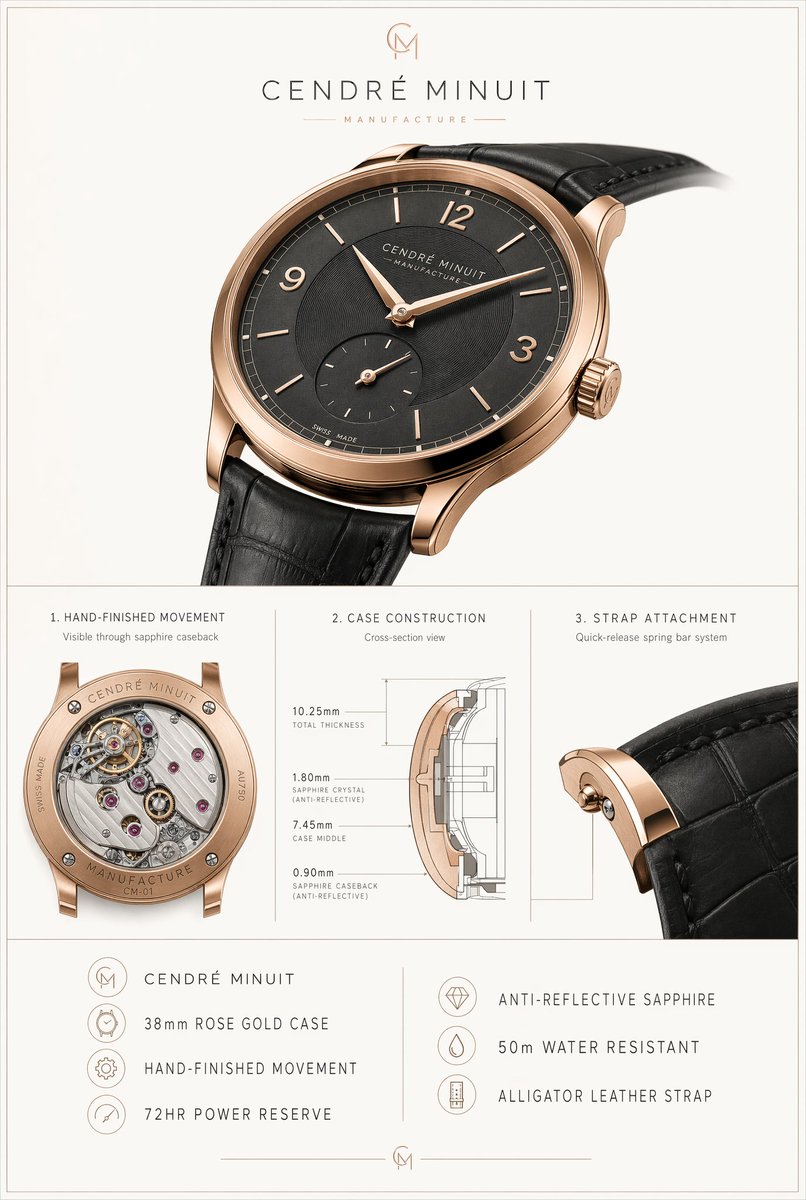
{"type":"pôster de especificação de produto de relógio de luxo","brand":{"name":"{argument name=\"brand name\" default=\"CENDRÉ MINUIT\"}","tagline":"MANUFACTURE","monogram":"CM"},"subject":{"product":"relógio de pulso social","case":{"diameter":"{argument name=\"case size\" default=\"38mm\"}","material":"{argument name=\"case material\" default=\"ouro rosa\"}","finish":"tom de ouro rosa quente de alto polimento","shape":"caixa redonda ultrafina com alças curvas elegantes","crown":"coroa canelada com monograma gravado"},"dial":{"color":"{argument name=\"dial color\" default=\"preto carvão\"}","style":"mostrador minimalista com textura setorial","markers":{"count":10,"details":"8 índices de bastão finos mais numerais arábicos às 12, 3 e 9 horas, sem marcador às 6 devido ao submostrador"},"hands":"ponteiros de horas e minutos em ouro rosa em formato de folha","subdials":{"count":1,"type":"pequenos segundos às 6 horas"},"text":["CENDRÉ MINUIT","MANUFACTURE","SWISS MADE"]},"strap":{"material":"{argument name=\"strap material\" default=\"couro de jacaré preto\"}","color":"preto","attachment":"sistema de mola de liberação rápida"},"movement":{"type":"movimento mecânico com acabamento manual","visible_caseback":true,"power_reserve":"72HR"}},"layout":{"background":"cinza claro quente e suave com borda de linha dupla fina ao redor de toda a tela","orientation":"pôster vertical","sections":[{"title":"foto do produto principal","position":"topo","count":1,"labels":["relógio principal"]},{"title":"1. MOVIMENTO COM ACABAMENTO MANUAL","position":"meio esquerdo","count":1,"labels":["Visível através do fundo de safira"]},{"title":"2. CONSTRUÇÃO DA CAIXA","position":"meio central","count":1,"labels":["Vista em corte transversal","10.25mm ESPESSURA TOTAL","1.80mm CRISTAL DE SAFIRA (ANTI-REFLEXO)","7.45mm MEIO DA CAIXA","0.90mm FUNDO DE SAFIRA (ANTI-REFLEXO)"]},{"title":"3. FIXAÇÃO DA PULSEIRA","position":"meio direito","count":1,"labels":["Sistema de mola de liberação rápida"]},{"title":"lista de recursos esquerda","position":"inferior esquerdo","count":4,"labels":["CENDRÉ MINUIT","CAIXA DE OURO ROSA 38mm","MOVIMENTO COM ACABAMENTO MANUAL","RESERVA DE MARCHA DE 72H"]},{"title":"lista de recursos direita","position":"inferior direito","count":3,"labels":["SAFIRA ANTI-REFLEXO","RESISTENTE À ÁGUA 50m","PULSEIRA DE COURO DE JACARÉ"]}],"dividers":"linhas finas cinzas verticais e horizontais separando as seções"},"visual_style":{"look":"anúncio de relógio suíço premium e folha de especificações técnicas","lighting":"iluminação de estúdio suave com reflexos metálicos realistas e sombras sutis","camera":"relógio principal mostrado em grande vista de três quartos frontal angulado levemente para a direita, pulseira estendendo-se para fora do quadro; closes macro detalhados nos painéis inferiores","typography":"tipografia sem serifa de luxo refinada em maiúsculas com espaçamento generoso entre letras","render_quality":"fotorrealista, catálogo de alto padrão, gravação precisa, textura de couro realista, linhas de diagrama técnico nítidas"}}Como adaptar estes prompts
Não copie só o estilo. Copie a estrutura.
- Para anúncios de produto, mantenha composição, luz, texto e qualidade; troque o produto e a campanha.
- Para mockups de UI, mantenha as seções da página; troque o produto, a navegação e o tema visual.
- Para infográficos, preserve primeiro a arquitetura da página; depois mude o assunto.
- Para e-commerce, mantenha a estrutura JSON; altere produto, material, painéis e câmera.
Para encontrar mais melhores prompts para GPT Image 2, abra a página de prompts GPT Image 2, escolha um caso de uso, copie uma estrutura e rode no workspace GPT Image 2.