Промпты для изображений в соцсетях: 10 шаблонов GPT Image 2
Используйте 10 готовых промптов GPT Image 2 для соцсетей: структура, порядок итераций, форматы постов и быстрые исправления для рабочих задач.
Если вы ищете social media image prompts, обычно вам не нужна еще одна длинная подборка размытых идей. Нужны промпты, которые уже привязаны к реальным типам постов, реальным форматам и реальным точкам отказа. В GPTIMG2 AI рабочий путь простой: сначала посмотреть примеры в GPT Image 2 prompt library, затем открыть GPT Image 2 workspace и адаптировать один понятный шаблон по одной переменной за раз.
Короткий ответ
- Сильный промпт для соцсетей сначала определяет формат: feed post, carousel cover, story cover, launch graphic, quote card или before/after.
- Самый быстрый способ улучшить результат — зафиксировать правду о предмете, а потом менять только один слой: формат, сцену, текстовую политику или свет.
- Если важна точность текста, просите короткие фразы, а не целые абзацы.
- Для вдохновения используйте prompt library.
- Для стабильных итераций и работы с референсами используйте workspace.
Структура промпта
Многие визуалы для соцсетей ломаются не из-за стиля, а из-за того, что промпт не объясняет задачу поста.
| Часть | Что указать | Почему это важно |
|---|---|---|
| Тип asset | Feed post, carousel cover, story cover, launch graphic, quote card, ad creative | Дает модели понятную композиционную задачу |
| Платформа или формат | 1:1, 4:5, 9:16, 16:9 | Уменьшает риск плохой компоновки |
| Правда о предмете | Продукт, founder, UI, packaging, brand colors, logo placement | Сохраняет связь с реальным брендом |
| Цель сообщения | Launch, education, proof, quote, sale, transformation, testimonial | Помогает изображению работать на пост |
| Стилизация | Editorial, minimal, bold, playful, premium, realistic | Добавляет настроение без подмены brief |
| Текстовая политика | Без текста, короткий headline, точная цитата, оставить negative space | Снижает ошибки с типографикой |
| Негативные ограничения | Без лишних товаров, без фейковых логотипов, без clutter, без нечитаемого текста | Убирает частые провалы |
Базовая формула:
Create a [asset type] for a [platform or crop] social media post.
Feature [subject or product] as the main focus and preserve the exact [brand colors, packaging, logo placement, UI details, or subject truth].
The visual goal is [launch, education, proof, quote, sale, transformation, testimonial].
Use [scene, lighting, camera/composition, styling cues].
Leave [negative space or exact text placement instruction] if text needs to be added.
Do not add [extra products, fake claims, distorted logos, clutter, unreadable text, random props].
Когда оставаться в prompt library, а когда идти в workspace
Оставайтесь в prompt library, если вам еще нужны:
- стартовое направление
- идеи по визуальным категориям
- словарь для промпта
- быстрое сравнение примеров
Сразу переходите в GPT Image 2 workspace, если:
- тип поста уже понятен
- нужно сохранить реальный продукт, screenshot или бренд-элемент
- вы хотите быстро сравнить несколько версий
- вы делаете серию assets для одной кампании
10 готовых промптов для соцсетей
1. Графика для запуска продукта
Create a premium social media launch graphic for a square feed post.
Feature [product or feature] as the hero subject and preserve the exact product shape, logo placement, packaging, or UI details from the reference.
Use a clean editorial composition with layered depth, realistic lighting, and a modern brand-forward color palette.
Leave clear negative space in the upper third for a short headline.
The visual goal is "new launch" rather than hard-sell discount advertising.
Do not add fake badges, unreadable text, extra products, or busy background clutter.
2. Обложка Instagram carousel
Create a bold 4:5 Instagram carousel cover image.
Feature [topic, product, or idea] with one dominant visual subject and a clear focal point.
Use high contrast, structured composition, and enough clean space for a short hook.
The image should feel polished, modern, and easy to read on mobile.
Add the headline text exactly: "[SHORT HOOK]".
Do not cram multiple ideas into the same frame, add dense paragraphs, or use cluttered backgrounds.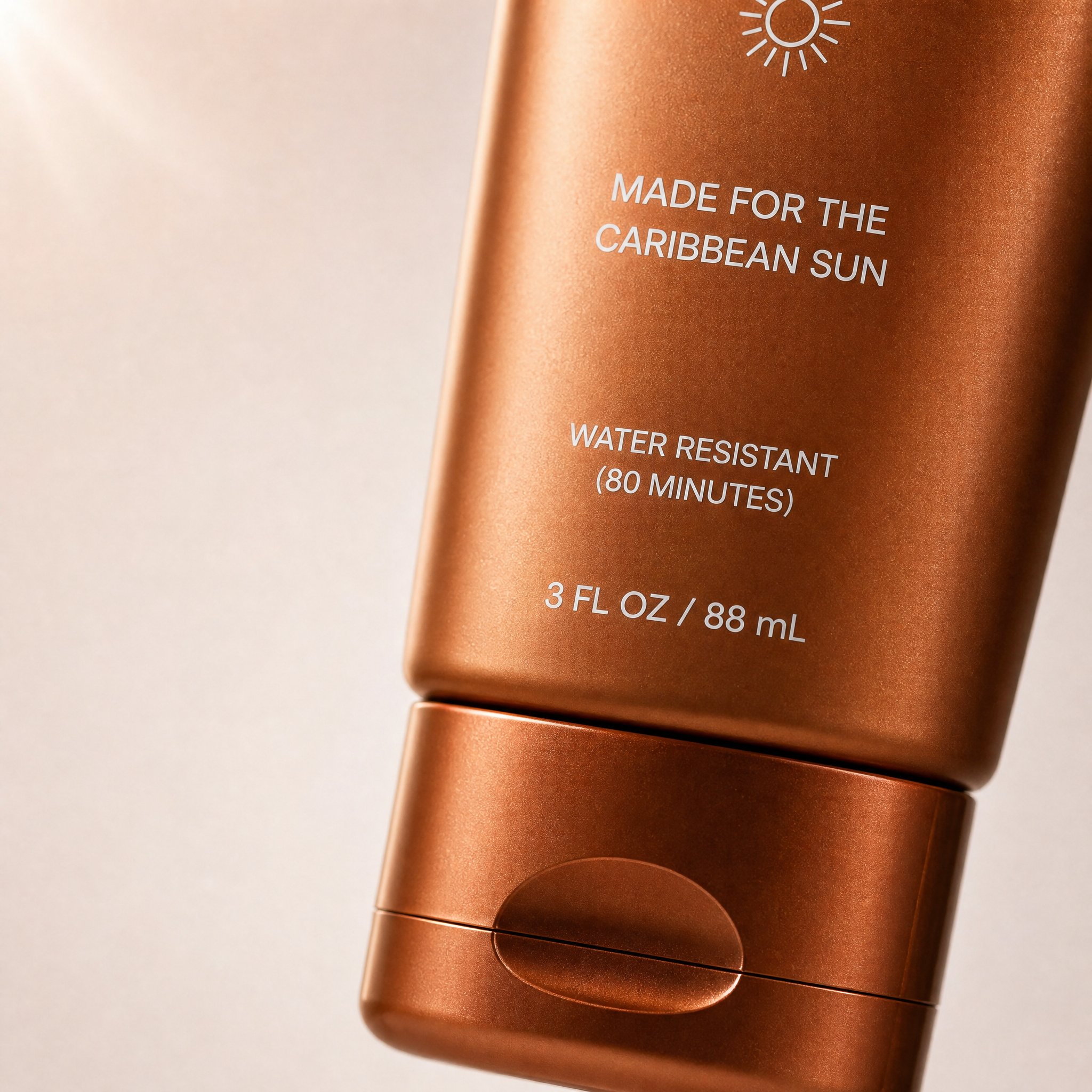
Это реальный пример carousel-визуала из prompt library. Он подходит сюда потому, что формат, фокус на одном объекте, negative space и DTC-стилистика точно совпадают с задачей первой карточки карусели.
Соответствующий prompt из prompt library:
Create a high-converting carousel image for this brand [PRODUCT] Ultra-clean, Apple-style design.
extreme macro shot to see the text "MADE FOR THE CARIBBEAN SUN", at the exact position it's currently is in the label. don't change the label or anything else. lots of negative space. Hyper-realistic 3D renders.

Soft gradient background, premium lighting, subtle shadows. Focus on simplicity, clarity, and elegance. No text. Mobile-first, 4:5, high-end DTC aesthetic.
3. Quote card
Create a branded quote-card visual for a square social post.
Use a minimal background, one supporting visual motif, and clean typography space.
Add the quote text exactly: "[SHORT QUOTE]".
Use the brand palette [describe colors] and keep the layout elegant, high-contrast, and mobile-readable.
The image should feel editorial rather than meme-like.
Do not add decorative clutter, fake signatures, long paragraphs, or tiny unreadable text.
4. Продукт с зоной под текст
Create a square product-focused social media image.
Preserve the exact product identity, color, label placement, packaging, and proportions.
Place the product on a clean branded surface with realistic lighting and subtle depth.
Keep the product large and sharp, but leave generous negative space on the right side for later headline placement.
The mood should feel premium, modern, and conversion-friendly.
Do not add extra text, extra props, fake benefits, or secondary products.
5. Пост before / after
Create a split-frame social media image that clearly shows a before-and-after transformation.
Use the left side for "before" and the right side for "after" with consistent framing and clear contrast.
Preserve the same subject identity across both sides.
The result should feel realistic, not exaggerated, and easy to understand in one glance.
Add minimal labels exactly: "Before" and "After".
Do not invent impossible changes, distort the subject, or use noisy visual effects that hide the comparison.
6. UGC-style пост
Create a realistic UGC-style social image for a mobile feed post.
Feature [person, product, or object] in a believable handheld or casual lifestyle context.
Use natural light, authentic framing, and a creator-style composition that feels spontaneous but still clean.
Keep the product or message visible without making the scene look like stock photography.
Leave subtle space for a short caption overlay if needed.
Do not make the image over-produced, fantasy-styled, or cluttered with props.
7. Сезонный campaign visual
Create a branded seasonal campaign visual for a square or 4:5 social post.
Feature [product or message] as the main subject and preserve the exact brand identity.
Add seasonal cues for [holiday or campaign moment] in a restrained, premium way.
Use a clear focal point, realistic lighting, and a campaign-ready composition.
Leave space for one short promotional line.
Do not overuse seasonal props, neon effects, fake discount stickers, or unrelated decorative elements.
8. Обложка Story или Reel
Create a 9:16 vertical story cover image for social media.
Use one dominant subject, strong vertical composition, and enough empty space in the top and bottom safe zones for interface overlays.
The image should feel bold, simple, and readable on mobile in one second.
Add the headline text exactly: "[SHORT TITLE]".
Do not place important details near the edges, add tiny text, or overload the frame with multiple focal points.
9. Фон для testimonial
Create a calm testimonial-style social background image for a square or portrait post.
Use a clean, premium composition with subtle brand texture, realistic lighting, and a supportive visual motif related to [product, workspace, category, or customer context].
Leave a large centered text-safe area for a testimonial overlay.
The design should feel credible, polished, and easy to read on mobile.
Do not add fake review stars, cluttered props, or busy patterns behind the text area.
10. Графика для LinkedIn или X
Create a social launch graphic optimized for a professional platform post.
Feature [product, founder, dashboard, or UI] with a clean high-contrast composition and a restrained brand palette.
The visual goal is clarity, credibility, and product relevance.
Leave space for a short headline or metric callout.
Use realistic lighting, crisp edges, and a polished modern software-brand aesthetic.
Do not use childish icons, loud gradients, fake metrics, or busy decorative effects.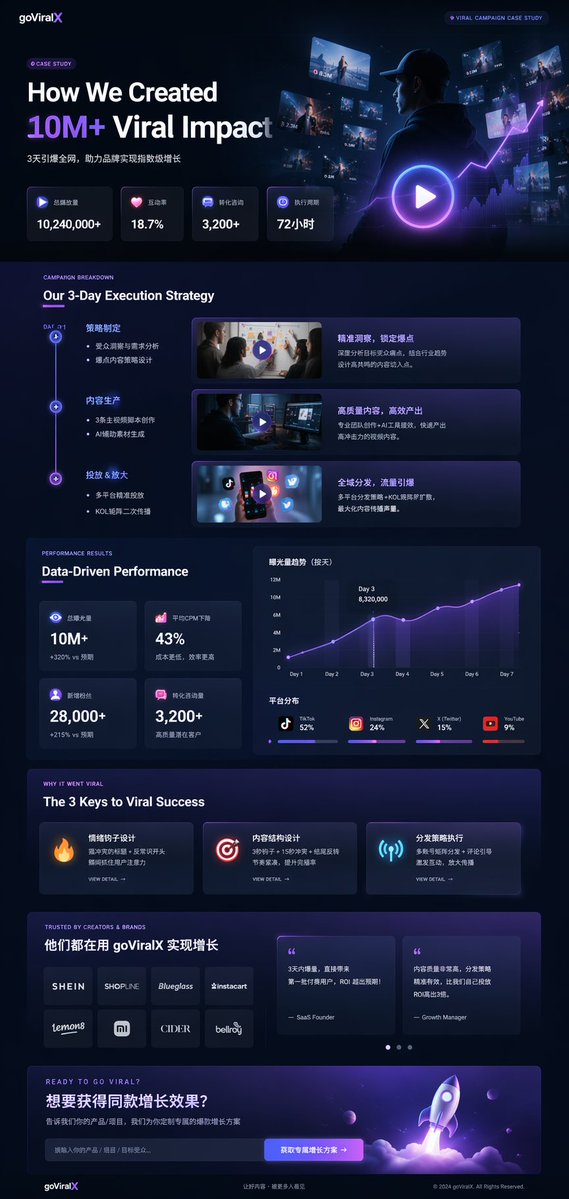
Это пример из prompt library для более профессионального launch / case-study поста. Он хорошо ложится на LinkedIn или X, потому что сочетает product framing, метрики и более убедительный software-brand язык.
Соответствующая структура prompt из prompt library:
{
  "type": "UI/UX landing page mockup",
  "theme": "dark mode, sleek modern aesthetic, glassmorphism, {argument name=\"primary accent color\" default=\"neon purple and blue\"} glowing accents",
  "header": {
    "logo": "{argument name=\"brand name\" default=\"goViralX\"}",
    "top_right_tag": "VIRAL CAMPAIGN CASE STUDY"
  },
  "layout": {
    "sections": [
      {
        "name": "Hero",
        "headline": "{argument name=\"hero headline\" default=\"How We Created 10M+ Viral Impact\"}",
        "visual": "cinematic shot of a person in a hoodie looking at glowing digital screens and graphs"
      }
    ]
  }
}
Как адаптировать один хороший промпт
Не переписывайте все с нуля. Лучше зафиксировать предмет и менять один слой за раз:
- тип asset
- truth of subject
- формат или платформа
- цель сообщения
- сцена или свет
- политика текста
Быстрые исправления
| Если результат слабый потому что... | Сначала меняйте... | Почему |
|---|---|---|
| пост выглядит слишком общим | тип asset и формат | конкретный deliverable лучше абстрактного стиля |
| в кадре слишком много идей | запросы на текст и второстепенные объекты | социальный визуал должен быть простым |
| текст выглядит плохо | объем текста | короткие строки стабильнее |
| теряется бренд | brand colors, subject truth, visual anchor | mood-only промпты быстро уводят картинку |
| изображение кажется фальшивым | свет и реквизит | переукрашивание снижает реализм |
Практический workflow для GPTIMG2
- найдите близкий паттерн в prompt library
- скопируйте одну из структур выше
- откройте GPT Image 2 workspace
- добавьте reference, если важна точность
- сделайте одну чистую версию
- меняйте по одной переменной
- добавьте финальный текст в дизайн-инструмент, если нужна точная типографика
Соседняя статья: Product Photo Prompt Templates.
FAQ
Чем промпт для соцсетей отличается от обычного промпта для изображения?
Он должен учитывать поведение ленты, мобильные форматы и мгновенную считываемость. Он описывает задачу поста, а не только стиль изображения.
Нужно ли просить модель отрисовать весь текст поста?
Обычно нет. Короткие точные фразы еще могут работать, но длинные тексты часто ломаются.
Когда нужен reference image?
Когда продукт, UI, упаковка или детали бренда должны остаться точными.
Эта статья заменяет prompt library?
Нет. Это execution guide. GPT Image 2 prompt library остается основным hub для примеров.
Итог
Полезный workflow по social media image prompts — это не бесконечный сбор примеров, а выбор правильного формата поста, написание промпта под этот формат и итерация без потери бренд-сигнала.