Prompts d’images pour les réseaux sociaux : 10 modèles GPT Image 2
Copiez 10 prompts GPT Image 2 pour réseaux sociaux, avec structure de prompt, ordre d’itération, formats de posts et correctifs rapides avec QA.
Si vous cherchez social media image prompts, vous n’avez généralement pas besoin d’une nouvelle longue liste d’idées vagues. Vous avez besoin de prompts qui correspondent déjà à de vrais formats de post, de vrais ratios et de vrais points de casse. Sur GPTIMG2 AI, le bon flux est simple : cherchez des exemples dans la GPT Image 2 prompt library, puis ouvrez la GPT Image 2 workspace pour adapter un modèle clair, une variable à la fois.
Réponse rapide
- Un bon prompt pour les réseaux sociaux commence par le livrable : feed post, carousel cover, story cover, launch graphic, quote card ou before/after.
- La manière la plus rapide d’améliorer un résultat est de figer le sujet, puis de modifier une seule couche : format, scène, texte ou lumière.
- Si la précision du texte compte, gardez un texte visible court et explicite.
- Utilisez la prompt library pour l’inspiration.
- Utilisez la workspace pour les itérations stables, les références visuelles et les tests rapides.
La structure de prompt qui garde le visuel exploitable
Beaucoup de visuels sociaux échouent parce qu’ils décrivent un style, pas le travail du post.
| Élément | Ce qu’il faut préciser | Pourquoi |
|---|---|---|
| Type d’asset | Feed post, carousel cover, story cover, launch graphic, quote card, ad creative | Donne au modèle une vraie tâche de composition |
| Plateforme ou ratio | 1:1, 4:5, 9:16, 16:9 | Évite les dérives de mise en page |
| Vérité du sujet | Produit, fondateur, UI, packaging, couleurs de marque, logo | Garde l’image reliée à l’actif réel |
| Objectif du message | Launch, education, proof, quote, sale, transformation, testimonial | Fait servir l’image au post |
| Indices de style | Editorial, minimal, bold, playful, premium, realistic | Donne une humeur sans remplacer le brief |
| Politique de texte | Pas de texte, titre court, citation exacte, espace vide | Réduit les problèmes typographiques |
| Règles négatives | Pas de faux logos, pas d’objets en trop, pas de texte illisible | Supprime les erreurs fréquentes |
Formule de base :
Create a [asset type] for a [platform or crop] social media post.
Feature [subject or product] as the main focus and preserve the exact [brand colors, packaging, logo placement, UI details, or subject truth].
The visual goal is [launch, education, proof, quote, sale, transformation, testimonial].
Use [scene, lighting, camera/composition, styling cues].
Leave [negative space or exact text placement instruction] if text needs to be added.
Do not add [extra products, fake claims, distorted logos, clutter, unreadable text, random props].
Quand rester dans la prompt library et quand passer dans la workspace
Restez dans la prompt library si vous avez encore besoin :
- d’une direction de départ
- d’idées de catégories visuelles
- de vocabulaire de prompt
- de comparer des exemples avant d’écrire votre prompt
Passez directement dans la GPT Image 2 workspace si :
- le type de post est déjà clair
- vous devez préserver un vrai produit, un screenshot ou un élément de marque
- vous voulez comparer rapidement plusieurs versions
- vous produisez une série d’assets pour la même campagne
10 prompts d’images sociales à copier
Ces prompts sont des points de départ. Remplacez les parties entre crochets par vos détails.
1. Visuel de lancement produit
Create a premium social media launch graphic for a square feed post.
Feature [product or feature] as the hero subject and preserve the exact product shape, logo placement, packaging, or UI details from the reference.
Use a clean editorial composition with layered depth, realistic lighting, and a modern brand-forward color palette.
Leave clear negative space in the upper third for a short headline.
The visual goal is "new launch" rather than hard-sell discount advertising.
Do not add fake badges, unreadable text, extra products, or busy background clutter.
2. Couverture de carousel Instagram
Create a bold 4:5 Instagram carousel cover image.
Feature [topic, product, or idea] with one dominant visual subject and a clear focal point.
Use high contrast, structured composition, and enough clean space for a short hook.
The image should feel polished, modern, and easy to read on mobile.
Add the headline text exactly: "[SHORT HOOK]".
Do not cram multiple ideas into the same frame, add dense paragraphs, or use cluttered backgrounds.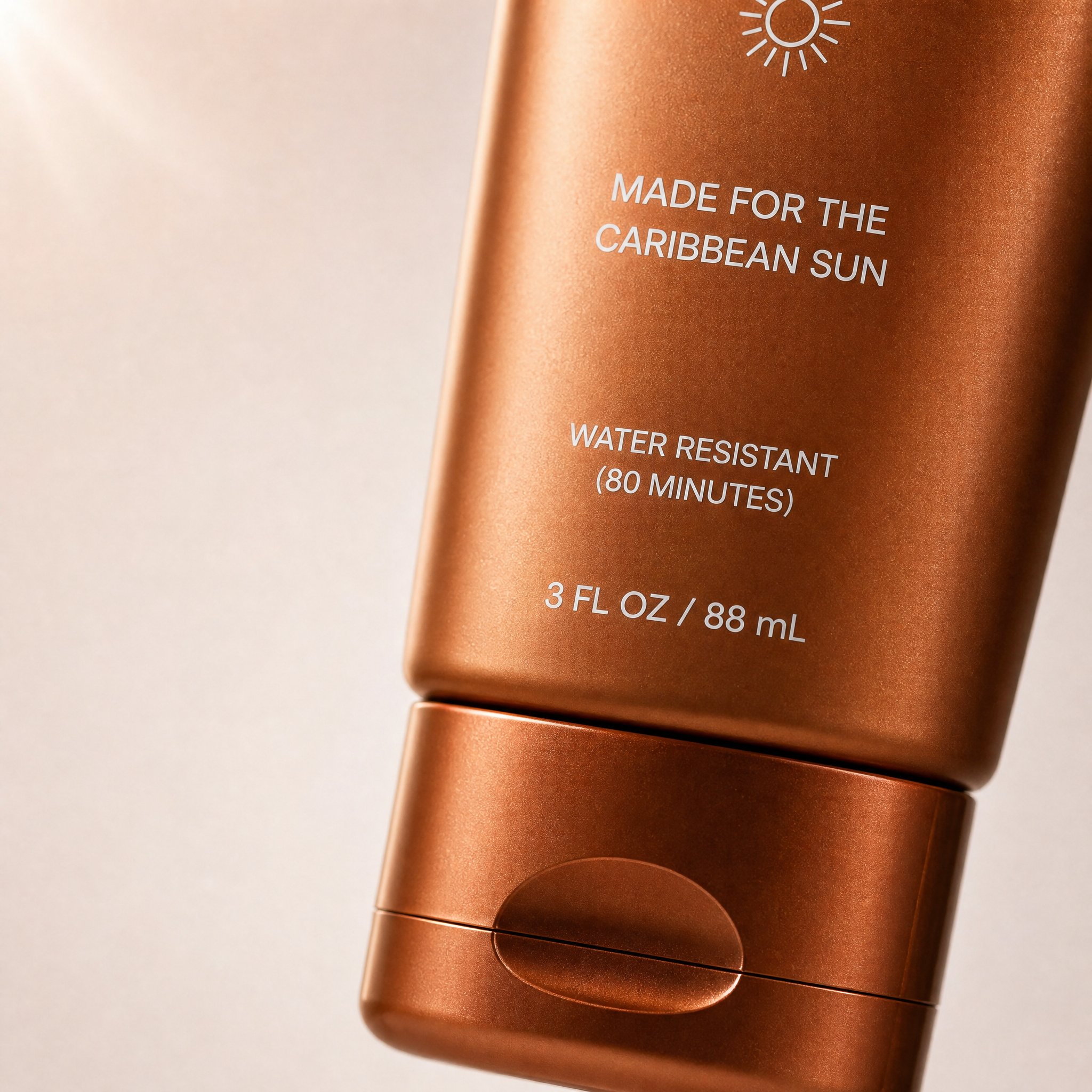
Voici un vrai exemple de style carousel issu de la prompt library. Il fonctionne ici parce que le format, le sujet principal, l’espace négatif et la tonalité DTC correspondent exactement au rôle de couverture de carousel.
Prompt correspondant depuis la prompt library :
Create a high-converting carousel image for this brand [PRODUCT] Ultra-clean, Apple-style design.
extreme macro shot to see the text "MADE FOR THE CARIBBEAN SUN", at the exact position it's currently is in the label. don't change the label or anything else. lots of negative space. Hyper-realistic 3D renders.

Soft gradient background, premium lighting, subtle shadows. Focus on simplicity, clarity, and elegance. No text. Mobile-first, 4:5, high-end DTC aesthetic.
3. Quote card de marque
Create a branded quote-card visual for a square social post.
Use a minimal background, one supporting visual motif, and clean typography space.
Add the quote text exactly: "[SHORT QUOTE]".
Use the brand palette [describe colors] and keep the layout elegant, high-contrast, and mobile-readable.
The image should feel editorial rather than meme-like.
Do not add decorative clutter, fake signatures, long paragraphs, or tiny unreadable text.
4. Produit avec zone de texte vide
Create a square product-focused social media image.
Preserve the exact product identity, color, label placement, packaging, and proportions.
Place the product on a clean branded surface with realistic lighting and subtle depth.
Keep the product large and sharp, but leave generous negative space on the right side for later headline placement.
The mood should feel premium, modern, and conversion-friendly.
Do not add extra text, extra props, fake benefits, or secondary products.
5. Visuel before / after
Create a split-frame social media image that clearly shows a before-and-after transformation.
Use the left side for "before" and the right side for "after" with consistent framing and clear contrast.
Preserve the same subject identity across both sides.
The result should feel realistic, not exaggerated, and easy to understand in one glance.
Add minimal labels exactly: "Before" and "After".
Do not invent impossible changes, distort the subject, or use noisy visual effects that hide the comparison.
6. Visuel style UGC
Create a realistic UGC-style social image for a mobile feed post.
Feature [person, product, or object] in a believable handheld or casual lifestyle context.
Use natural light, authentic framing, and a creator-style composition that feels spontaneous but still clean.
Keep the product or message visible without making the scene look like stock photography.
Leave subtle space for a short caption overlay if needed.
Do not make the image over-produced, fantasy-styled, or cluttered with props.
7. Visuel de campagne saisonnière
Create a branded seasonal campaign visual for a square or 4:5 social post.
Feature [product or message] as the main subject and preserve the exact brand identity.
Add seasonal cues for [holiday or campaign moment] in a restrained, premium way.
Use a clear focal point, realistic lighting, and a campaign-ready composition.
Leave space for one short promotional line.
Do not overuse seasonal props, neon effects, fake discount stickers, or unrelated decorative elements.
8. Couverture Story ou Reel
Create a 9:16 vertical story cover image for social media.
Use one dominant subject, strong vertical composition, and enough empty space in the top and bottom safe zones for interface overlays.
The image should feel bold, simple, and readable on mobile in one second.
Add the headline text exactly: "[SHORT TITLE]".
Do not place important details near the edges, add tiny text, or overload the frame with multiple focal points.
9. Fond pour testimonial
Create a calm testimonial-style social background image for a square or portrait post.
Use a clean, premium composition with subtle brand texture, realistic lighting, and a supportive visual motif related to [product, workspace, category, or customer context].
Leave a large centered text-safe area for a testimonial overlay.
The design should feel credible, polished, and easy to read on mobile.
Do not add fake review stars, cluttered props, or busy patterns behind the text area.
10. Visuel de lancement LinkedIn ou X
Create a social launch graphic optimized for a professional platform post.
Feature [product, founder, dashboard, or UI] with a clean high-contrast composition and a restrained brand palette.
The visual goal is clarity, credibility, and product relevance.
Leave space for a short headline or metric callout.
Use realistic lighting, crisp edges, and a polished modern software-brand aesthetic.
Do not use childish icons, loud gradients, fake metrics, or busy decorative effects.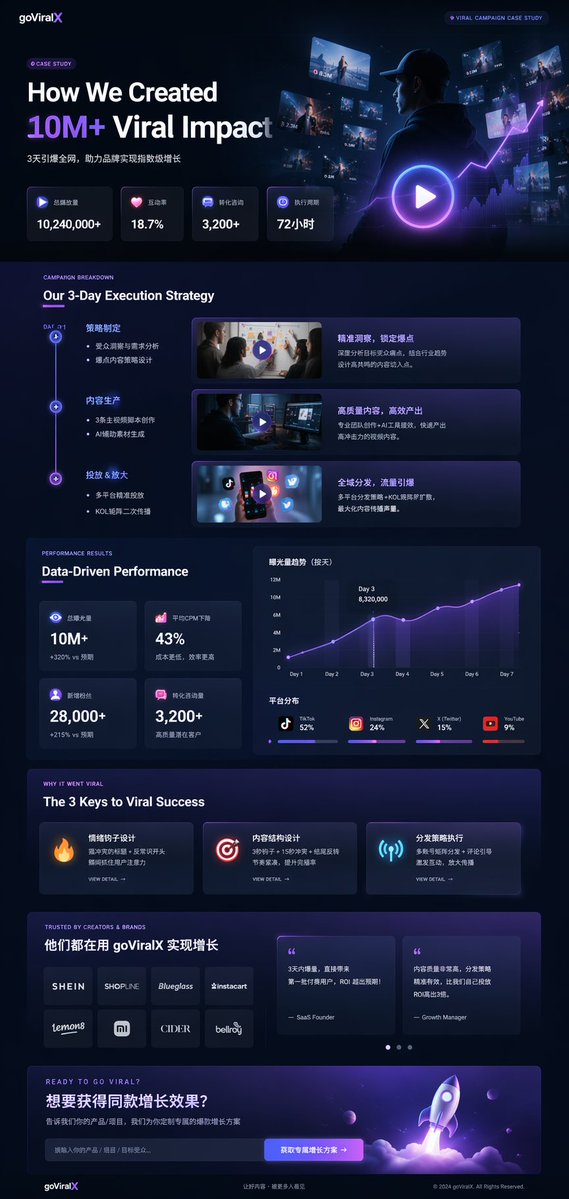
Cet exemple de la prompt library convient bien à LinkedIn ou X : il combine cadrage produit, hiérarchie de métriques et langage visuel crédible pour une marque logicielle.
Structure de prompt correspondante depuis la prompt library :
{
  "type": "UI/UX landing page mockup",
  "theme": "dark mode, sleek modern aesthetic, glassmorphism, {argument name=\"primary accent color\" default=\"neon purple and blue\"} glowing accents",
  "header": {
    "logo": "{argument name=\"brand name\" default=\"goViralX\"}",
    "top_right_tag": "VIRAL CAMPAIGN CASE STUDY"
  },
  "layout": {
    "sections": [
      {
        "name": "Hero",
        "headline": "{argument name=\"hero headline\" default=\"How We Created 10M+ Viral Impact\"}",
        "visual": "cinematic shot of a person in a hoodie looking at glowing digital screens and graphs"
      }
    ]
  }
}
Comment itérer sans tout réécrire
Le bon flux n’est pas d’écrire dix prompts différents, mais de garder le sujet stable et de changer une seule couche à la fois :
- fixer le type d’asset
- fixer la vérité du sujet
- changer le ratio ou la plateforme
- changer l’objectif du message
- changer la scène ou la lumière
- changer ensuite seulement la politique de texte
Correctifs rapides
| Si le résultat échoue parce que... | Changez d’abord... | Pourquoi |
|---|---|---|
| le post paraît générique | le type d’asset et le ratio | un vrai livrable vaut mieux qu’un style vague |
| l’image contient trop d’idées | les demandes de texte et les sujets secondaires | un visuel social doit rester simple |
| la typo rend mal | la quantité de texte | un texte court est plus stable |
| la marque disparaît | les couleurs, le produit, un ancrage visuel | les prompts de pure ambiance dérivent vite |
| l’image paraît fausse | la lumière et les accessoires | trop d’effets réduit le réalisme |
Workflow GPTIMG2 recommandé
- trouver un motif proche dans la prompt library
- copier une structure ci-dessus
- ouvrir la GPT Image 2 workspace
- ajouter une référence si la fidélité visuelle compte
- lancer une première version simple
- modifier une seule variable par itération
- ajouter le texte final dans votre outil de design si nécessaire
Voir aussi Product Photo Prompt Templates si vous avez besoin d’un système plus centré produit.
FAQ
Quelle est la différence entre un prompt social et un prompt d’image général ?
Un prompt social doit respecter le comportement du feed, les ratios mobiles et la lisibilité immédiate. Il décrit le travail du post, pas seulement un style.
Faut-il demander au modèle de rendre tout le texte du post ?
En général non. Quelques mots précis peuvent fonctionner, mais un long texte casse souvent. Mieux vaut laisser de l’espace et ajouter le texte ensuite.
Quand utiliser une image de référence ?
Quand le produit, l’UI, le packaging ou les détails de marque doivent rester exacts.
Cette page remplace-t-elle la prompt library ?
Non. Cette page est le guide d’exécution. La GPT Image 2 prompt library reste le hub principal pour parcourir les exemples.
Conclusion
Un bon workflow social media image prompts ne consiste pas à accumuler des exemples. Il consiste à choisir le bon format, écrire un prompt qui sert ce format, puis itérer sans perdre le signal de marque.