Prompts de imagem para redes sociais: 10 modelos GPT Image 2
Use 10 prompts prontos de GPT Image 2 para redes sociais, com estrutura de prompt, ordem de iteração, formatos de post e correções rápidas e QA.
Se você procura social media image prompts, normalmente não precisa de mais uma lista longa de ideias vagas. Você precisa de prompts que já correspondam a tipos reais de post, formatos reais e falhas reais. No GPTIMG2 AI, o fluxo mais útil é simples: navegue por exemplos na GPT Image 2 prompt library, depois abra a GPT Image 2 workspace para adaptar um modelo claro, uma variável por vez.
Resposta rápida
- Um bom prompt para redes sociais começa pelo entregável: feed post, carousel cover, story cover, launch graphic, quote card ou before/after.
- A forma mais rápida de melhorar o resultado é travar a verdade do assunto e mudar só uma camada por vez: formato, cena, política de texto ou iluminação.
- Se a precisão do texto importa, use frases curtas e explícitas.
- Use a prompt library para inspiração.
- Use a workspace para iteração estável, referência visual e testes rápidos.
Estrutura de prompt
Muitos visuais sociais falham porque descrevem estilo, mas não descrevem o trabalho do post.
| Parte | O que especificar | Por quê |
|---|---|---|
| Tipo de asset | Feed post, carousel cover, story cover, launch graphic, quote card, ad creative | Dá ao modelo uma tarefa clara de composição |
| Plataforma ou proporção | 1:1, 4:5, 9:16, 16:9 | Evita desvios de layout |
| Verdade do assunto | Produto, founder, UI, packaging, brand colors, logo placement | Mantém a imagem ligada ao ativo real |
| Objetivo da mensagem | Launch, education, proof, quote, sale, transformation, testimonial | Faz a imagem servir ao post |
| Cues de estilo | Editorial, minimal, bold, playful, premium, realistic | Dá direção visual sem substituir o brief |
| Política de texto | Sem texto, headline curta, citação exata, negative space | Reduz erros tipográficos |
| Regras negativas | Sem produtos extras, sem logos falsos, sem clutter, sem texto ilegível | Remove falhas comuns |
Fórmula base:
Create a [asset type] for a [platform or crop] social media post.
Feature [subject or product] as the main focus and preserve the exact [brand colors, packaging, logo placement, UI details, or subject truth].
The visual goal is [launch, education, proof, quote, sale, transformation, testimonial].
Use [scene, lighting, camera/composition, styling cues].
Leave [negative space or exact text placement instruction] if text needs to be added.
Do not add [extra products, fake claims, distorted logos, clutter, unreadable text, random props].
Quando ficar na prompt library e quando abrir a workspace
Fique na prompt library se você ainda precisa de:
- direção inicial
- ideias de categoria visual
- vocabulário de prompt
- comparar exemplos antes de escrever o seu
Vá direto para a GPT Image 2 workspace se:
- o tipo de post já está claro
- você precisa preservar um produto real, screenshot ou elemento de marca
- quer comparar versões rapidamente
- está produzindo uma série de assets para a mesma campanha
10 prompts prontos para imagens sociais
1. Post de lançamento de produto
Create a premium social media launch graphic for a square feed post.
Feature [product or feature] as the hero subject and preserve the exact product shape, logo placement, packaging, or UI details from the reference.
Use a clean editorial composition with layered depth, realistic lighting, and a modern brand-forward color palette.
Leave clear negative space in the upper third for a short headline.
The visual goal is "new launch" rather than hard-sell discount advertising.
Do not add fake badges, unreadable text, extra products, or busy background clutter.
2. Capa de carousel do Instagram
Create a bold 4:5 Instagram carousel cover image.
Feature [topic, product, or idea] with one dominant visual subject and a clear focal point.
Use high contrast, structured composition, and enough clean space for a short hook.
The image should feel polished, modern, and easy to read on mobile.
Add the headline text exactly: "[SHORT HOOK]".
Do not cram multiple ideas into the same frame, add dense paragraphs, or use cluttered backgrounds.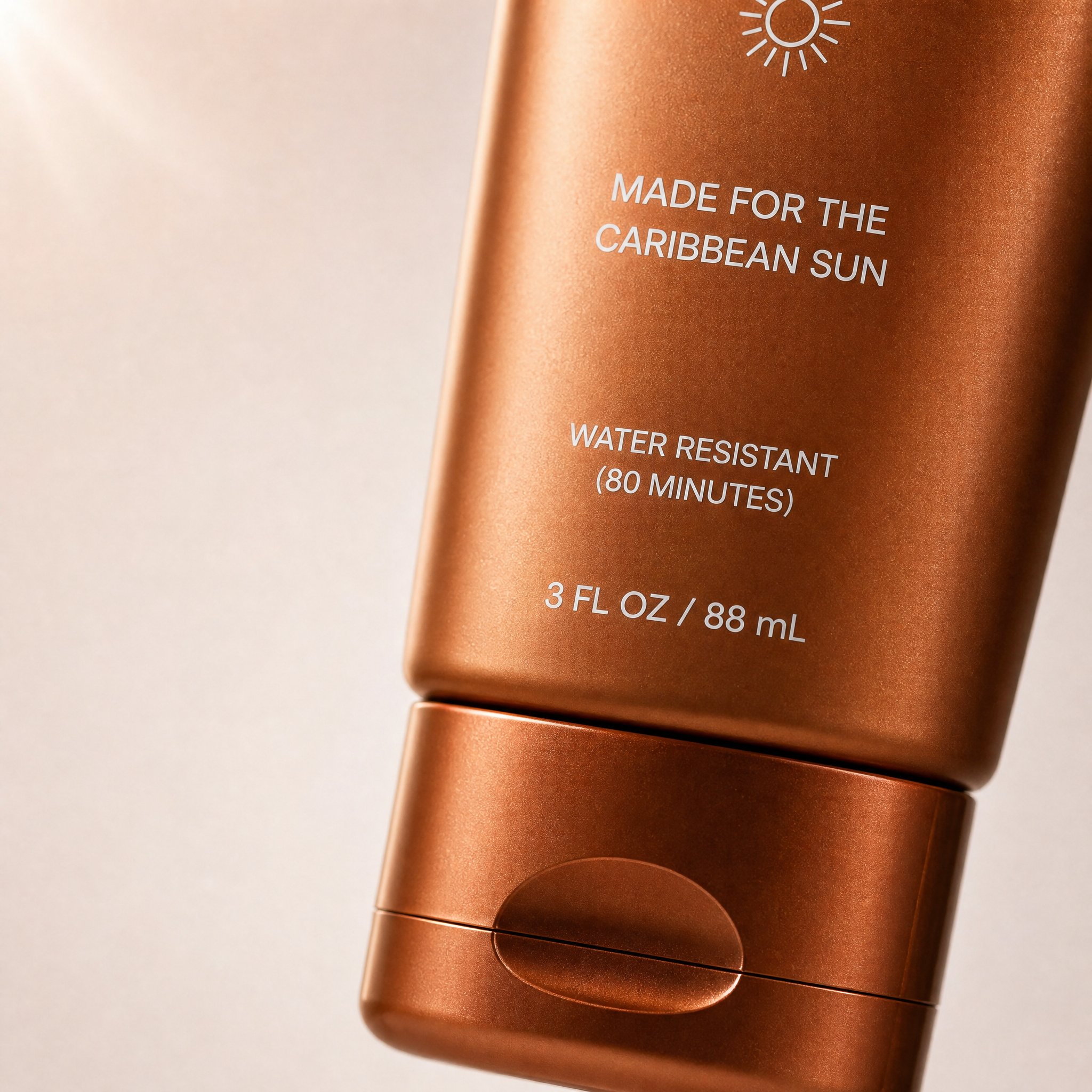
Este é um exemplo real de visual para carousel vindo da prompt library. Ele funciona aqui porque crop, foco no assunto, negative space e tom DTC combinam exatamente com o trabalho de uma capa de carousel.
Prompt correspondente da prompt library:
Create a high-converting carousel image for this brand [PRODUCT] Ultra-clean, Apple-style design.
extreme macro shot to see the text "MADE FOR THE CARIBBEAN SUN", at the exact position it's currently is in the label. don't change the label or anything else. lots of negative space. Hyper-realistic 3D renders.

Soft gradient background, premium lighting, subtle shadows. Focus on simplicity, clarity, and elegance. No text. Mobile-first, 4:5, high-end DTC aesthetic.
3. Quote card de marca
Create a branded quote-card visual for a square social post.
Use a minimal background, one supporting visual motif, and clean typography space.
Add the quote text exactly: "[SHORT QUOTE]".
Use the brand palette [describe colors] and keep the layout elegant, high-contrast, and mobile-readable.
The image should feel editorial rather than meme-like.
Do not add decorative clutter, fake signatures, long paragraphs, or tiny unreadable text.
4. Produto com espaço negativo
Create a square product-focused social media image.
Preserve the exact product identity, color, label placement, packaging, and proportions.
Place the product on a clean branded surface with realistic lighting and subtle depth.
Keep the product large and sharp, but leave generous negative space on the right side for later headline placement.
The mood should feel premium, modern, and conversion-friendly.
Do not add extra text, extra props, fake benefits, or secondary products.
5. Post before / after
Create a split-frame social media image that clearly shows a before-and-after transformation.
Use the left side for "before" and the right side for "after" with consistent framing and clear contrast.
Preserve the same subject identity across both sides.
The result should feel realistic, not exaggerated, and easy to understand in one glance.
Add minimal labels exactly: "Before" and "After".
Do not invent impossible changes, distort the subject, or use noisy visual effects that hide the comparison.
6. Post estilo UGC
Create a realistic UGC-style social image for a mobile feed post.
Feature [person, product, or object] in a believable handheld or casual lifestyle context.
Use natural light, authentic framing, and a creator-style composition that feels spontaneous but still clean.
Keep the product or message visible without making the scene look like stock photography.
Leave subtle space for a short caption overlay if needed.
Do not make the image over-produced, fantasy-styled, or cluttered with props.
7. Visual de campanha sazonal
Create a branded seasonal campaign visual for a square or 4:5 social post.
Feature [product or message] as the main subject and preserve the exact brand identity.
Add seasonal cues for [holiday or campaign moment] in a restrained, premium way.
Use a clear focal point, realistic lighting, and a campaign-ready composition.
Leave space for one short promotional line.
Do not overuse seasonal props, neon effects, fake discount stickers, or unrelated decorative elements.
8. Capa de Story ou Reel
Create a 9:16 vertical story cover image for social media.
Use one dominant subject, strong vertical composition, and enough empty space in the top and bottom safe zones for interface overlays.
The image should feel bold, simple, and readable on mobile in one second.
Add the headline text exactly: "[SHORT TITLE]".
Do not place important details near the edges, add tiny text, or overload the frame with multiple focal points.
9. Fundo para testimonial
Create a calm testimonial-style social background image for a square or portrait post.
Use a clean, premium composition with subtle brand texture, realistic lighting, and a supportive visual motif related to [product, workspace, category, or customer context].
Leave a large centered text-safe area for a testimonial overlay.
The design should feel credible, polished, and easy to read on mobile.
Do not add fake review stars, cluttered props, or busy patterns behind the text area.
10. Gráfico de lançamento para LinkedIn ou X
Create a social launch graphic optimized for a professional platform post.
Feature [product, founder, dashboard, or UI] with a clean high-contrast composition and a restrained brand palette.
The visual goal is clarity, credibility, and product relevance.
Leave space for a short headline or metric callout.
Use realistic lighting, crisp edges, and a polished modern software-brand aesthetic.
Do not use childish icons, loud gradients, fake metrics, or busy decorative effects.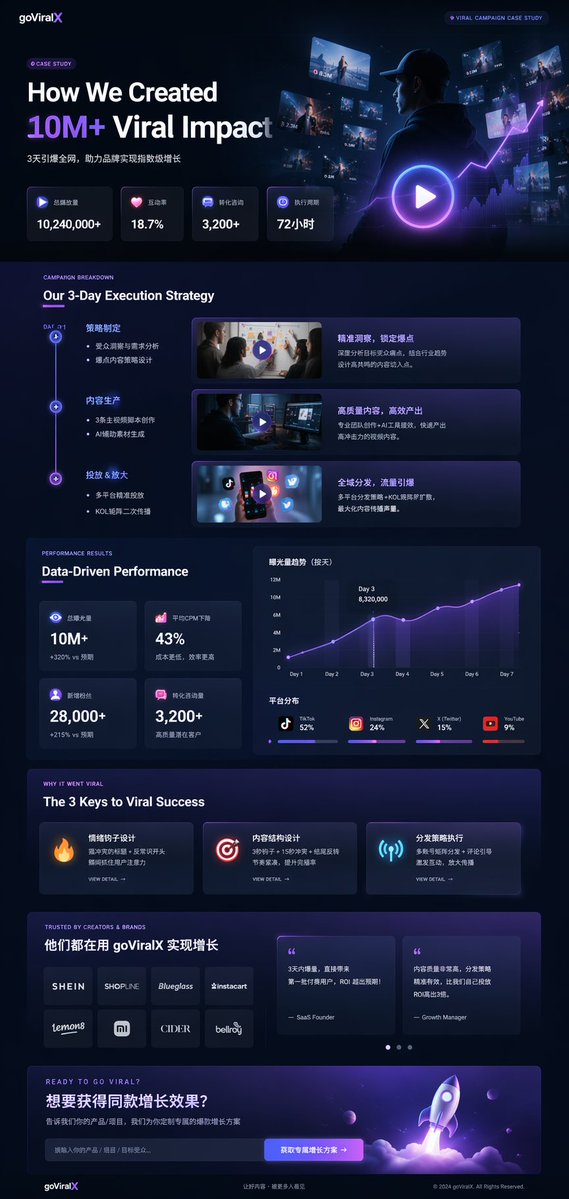
Este exemplo da prompt library funciona bem para LinkedIn ou X porque combina framing de produto, hierarquia de métricas e uma linguagem visual mais confiável para marcas de software.
Estrutura de prompt correspondente da prompt library:
{
  "type": "UI/UX landing page mockup",
  "theme": "dark mode, sleek modern aesthetic, glassmorphism, {argument name=\"primary accent color\" default=\"neon purple and blue\"} glowing accents",
  "header": {
    "logo": "{argument name=\"brand name\" default=\"goViralX\"}",
    "top_right_tag": "VIRAL CAMPAIGN CASE STUDY"
  },
  "layout": {
    "sections": [
      {
        "name": "Hero",
        "headline": "{argument name=\"hero headline\" default=\"How We Created 10M+ Viral Impact\"}",
        "visual": "cinematic shot of a person in a hoodie looking at glowing digital screens and graphs"
      }
    ]
  }
}
Como adaptar um bom prompt
Em vez de reescrever tudo, mantenha o assunto estável e mude uma camada por vez:
- tipo de asset
- verdade do assunto
- formato ou plataforma
- objetivo da mensagem
- cena ou luz
- política de texto
Correções rápidas
| Se o resultado falha porque... | Mude primeiro... | Por quê |
|---|---|---|
| o post parece genérico | o tipo de asset e o formato | um entregável específico é melhor que estilo abstrato |
| há ideias demais na imagem | pedidos de texto e assuntos secundários | visual social precisa ser simples |
| a tipografia sai ruim | a quantidade de texto | textos curtos são mais estáveis |
| a marca some | brand colors, verdade do produto, âncora visual | prompts só de mood desviam rápido |
| a imagem parece falsa | iluminação e props | excesso de efeito reduz realismo |
Workflow prático no GPTIMG2
- encontre um padrão próximo na prompt library
- copie uma estrutura acima
- abra a GPT Image 2 workspace
- use uma referência se fidelidade importa
- gere uma versão simples
- mude uma variável por vez
- finalize o texto no seu editor de design se precisar de precisão
Veja também Product Photo Prompt Templates para um sistema mais focado em produto.
FAQ
O que diferencia um prompt para redes sociais de um prompt geral de imagem?
Ele precisa respeitar comportamento de feed, formatos móveis e leitura imediata. Ele descreve o trabalho do post, não só o estilo da imagem.
Devo pedir para o modelo renderizar todo o texto do post?
Geralmente não. Frases curtas podem funcionar, mas textos longos quebram com frequência.
Quando usar uma imagem de referência?
Quando o produto, a UI, a embalagem ou detalhes da marca precisam permanecer exatos.
Esta página substitui a prompt library?
Não. Esta página é o guia de execução. A GPT Image 2 prompt library continua sendo o hub principal de exemplos.
Conclusão
Um workflow útil de social media image prompts não é colecionar exemplos sem fim. É escolher o formato certo, escrever um prompt que sirva a esse formato e iterar sem perder o sinal da marca.